Ucanly Sales CRM
The admissions desk, without the spreadsheet.
The counsellor desk, the manager’s sheet and the follow-up, in one place. Leads arrive, get allocated to counsellors, get called, and turn into enrolments and payments, with the manager able to see all of it without asking anyone for an update.
A grid that behaves like a spreadsheet
Most admissions teams run on a shared sheet until it breaks. It breaks predictably: two people edit the same row, nobody knows who called whom, and the manager finds out a lead went cold a week after it did.
This keeps what people actually like about a spreadsheet (click a cell, type, move on) and adds the parts a spreadsheet cannot do. Every row has one owner. Every edit is kept with who made it and when. Select a range and bulk update it, then undo if that was wrong. Each user keeps their own column layout, so the manager’s view and the counsellor’s view do not have to be the same view.
-
Keys you already knowArrow keys to move, Ctrl+D and Ctrl+R to fill down and right, copy and paste between cells.
-
Saved viewsFilter chips for today’s queue, overdue, not called yet. Save your own and they stay yours.
-
Colour that means somethingEach row takes the colour of its status, so a page of DNPs looks like one.
Home / Work / My leads
My leads
Log each call in the next free status slot. Edits save as you type.
EverythingToday’s queueOverdueNot called yetFollow UpDNP
| # | Ref | Name* | Status | Comment |
|---|---|---|---|---|
| 1 | DEMO-0005 | Gaurav Mishra | Enrolled | |
| 2 | DEMO-0030 | Sanjana Iyer | Follow Up | Wants fee split |
| 3 | DEMO-0092 | Pooja Sharma | DNP | |
| 4 | DEMO-0056 | Karthik Banerjee | Call Back Later | Exams till Wed |
| 5 | DEMO-0067 | Pooja Rao | Call Back Later | |
| 6 | DEMO-0066 | Nandini Banerjee | Busy | |
| 7 | DEMO-0071 | Aditya Nair | Follow Up | Sent brochure |
| 8 | DEMO-0074 | Meera Pillai | Enrolled | November batch |
| 9 | DEMO-0081 | Rohan Kulkarni | DNP | |
| 10 | DEMO-0088 | Ishita Rao | Call Back Later | After 5 pm |
| 11 | DEMO-0090 | Vivek Shetty | Follow Up | Parents call Sat |
Saved
Import and allocation, with a way back
Leads come in from a pasted sheet, a CSV, the public intake form on your website, or one at a time. They wait in New leads until somebody owns them.
Before an import is saved you see where every column is going and which rows look like leads you already have. Afterwards it sits in the import history, where the whole batch can be rolled back.
-
An inbox for new leadsEverything unallocated sits in one place, so nothing arrives and quietly goes nowhere.
-
By hand or across the teamAssign individually, or auto-allocate round robin or by evening out the load. The split is shown first and nothing moves until you commit.
-
Segmenting, not stealingA lead can be given to a second counsellor as its own working copy without taking it from the first. Useful when a colleague speaks the language, or the parent calls back and someone else picks up.
-
New leads appear without a reloadA counsellor’s list picks up what was just allocated to them within about twenty seconds.
Home / Leads / Add leads
Add leads
Paste from your sheet
Select the Name → State block in Google Sheets and paste it below. A header row is fine, it gets skipped.
Rows
Preview…or upload a CSV with the same nine columns
4 row(s) readyDiscard
1 of these 4 row(s) share an email address or phone number with a lead already in the CRM. They are marked below.
Where each column is going
| Field | From column | First value | Filled |
|---|---|---|---|
| Full name | 1 | Ananya Iyer | 4 of 4 |
| 2 | ananya.iyer@example.invalid | 4 of 4 | |
| Mobile | 3 | 9845012345 | 4 of 4 |
| Institution | 4 | PES University | 4 of 4 |
| Program / department | 5 | CSE | 4 of 4 |
| Academic year | 6 | 3rd Year Undergraduate | 4 of 4 |
| Career domain | 7 | Data Science | 4 of 4 |
Import 4 lead(s)
4 lead(s) added. Allocate them to a BD to move them onto the Main Sheet.
Home / Work / New leads
New leads
Auto-allocate
Auto-allocate all 23 waiting
Round robin, deal them out evenlyCap per BD
0Nothing moves until you confirm the preview.
| Ref | Name | Status | Source |
|---|---|---|---|
| DEMO-0154 | Vikram Verma | Not called | Website form |
| DEMO-0149 | Karthik Patel | Not called | |
| DEMO-0142 | Lakshmi Mishra | Not called | Webinar |
| DEMO-0139 | Aditya Shetty | Not called | Walk-in |
| DEMO-0138 | Gaurav Gupta | Not called | Website form |
Nothing has moved yet. This is what would happen if you commit.
23 lead(s) → 3 BD(s)Round robin, deal them out evenly
| BD | Open now | Adding | After |
|---|---|---|---|
| Arjun Menon | 28 | +0 | 28 |
| Rahul Deshpande | 34 | +0 | 34 |
| Sneha Kulkarni | 31 | +0 | 31 |
Commit — allocate 23Cancel
23 lead(s) allocated — they are now on the Main Sheet.
Call mode, in priority order
A counsellor opening a list of two hundred leads and deciding who to ring is a counsellor not ringing anybody.
Call mode hands them one lead at a time: overdue call-backs first, then new leads, then follow-ups. Nine outcomes sit on the number keys, Enter saves and brings up the next lead, S skips. The statuses are the ones the work actually has. A switched-off phone is not the same as somebody who said no, and a busy tone is not the same as no answer, so they are filed separately.
-
A time on every call-backCall Back Later asks when. A promise without a time is the one that gets forgotten.
-
A reason when nobody answersRang out, busy tone, switched off, wrong number: one tap, so the pattern shows up later.
-
Notes in a tapThe usual notes are buttons. WhatsApp and SMS open on the counsellor’s own phone from the lead.
Home / Work / Call mode
Call mode Worked in priority order: overdue call-backs, then new leads, then follow-ups.
DEMO-0046Follow Up
Tanvi Bhat
Marked Follow Up on the last call.
+91 98322 85659
WhatsApp- College
- SRM Institute of Science and Technology
- Branch
- Mechanical
- Interested domain
- Full Stack Development
- Languages
- English, Telugu
Outcome
Why
Rang, no answerBusy toneCall was cutPhone switched off
Call back at
A call-back without a time is the promise everyone forgets.
Note
No answerAsked to call laterWants brochureWill discuss with parents
Save & nextSkip
Students who never pick up
Every admissions team has a pile of leads that ring out. Most of them are quietly abandoned by whoever holds them.
Here every try is recorded with its reason. After a minimum number of tries a lead goes to a manager instead of disappearing, and the manager decides: send it back for another go, give it to someone else, park it until a date, or close it. A separate report shows unanswered rates by counsellor, by source and by time of day, so a bad list is not blamed on a person.
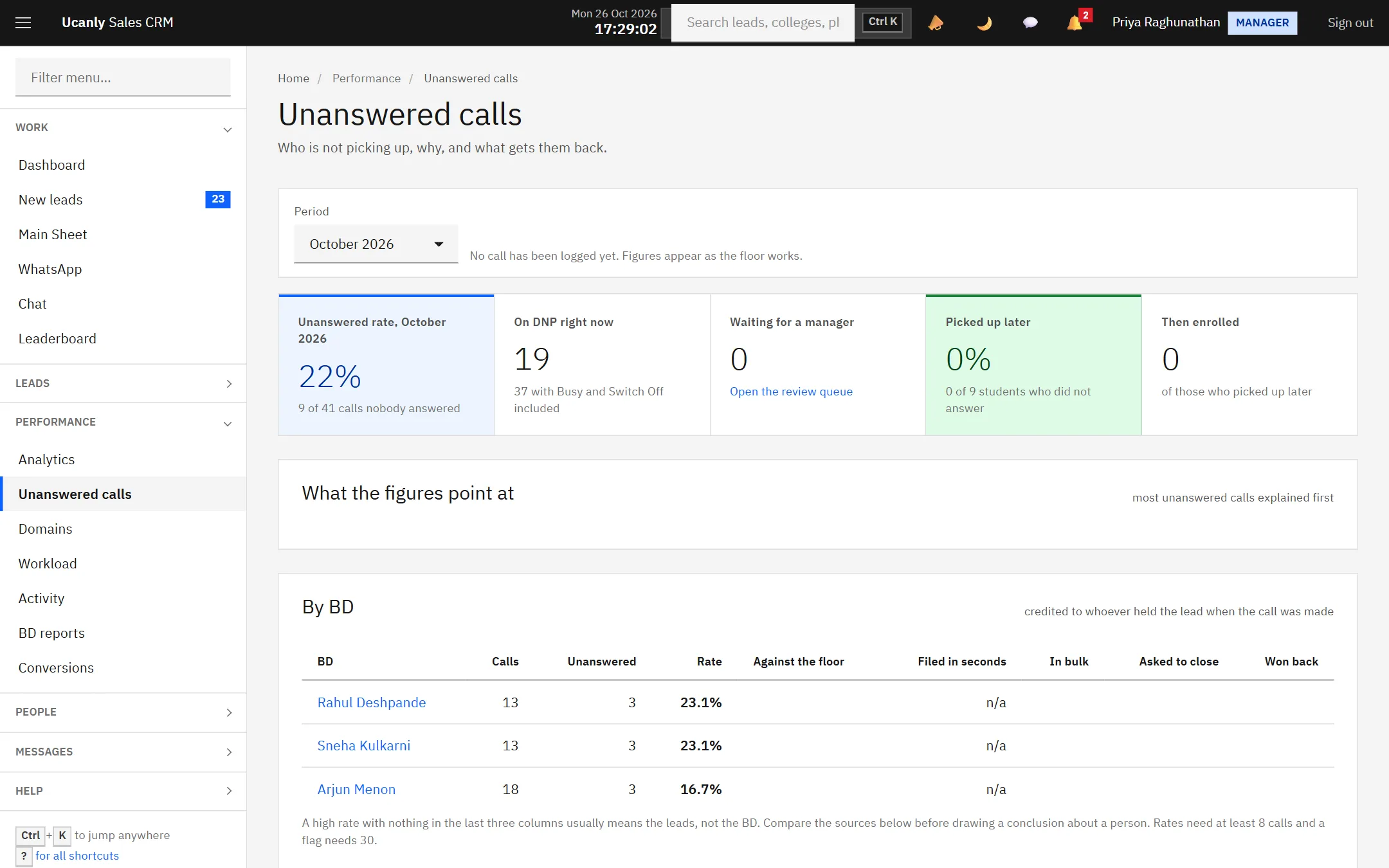
Unanswered calls, by BD and by source, so a pattern is not blamed on a person.
Home / Leads / DNP review
DNP review
Leads that have not picked up after the minimum number of tries.
Unanswered rate
22%9 of 41 calls nobody answeredOn DNP right now
19with Busy and Switch OffWaiting for a manager
3in this queue| Student | BD | Tries | Most common reason | Decision | |
|---|---|---|---|---|---|
| Pooja Sharma | Arjun Menon | 5 | Rang, no answer | Send backReassignPark | |
| Rakesh Nair | Sneha Kulkarni | 6 | Phone switched off | Send backReassignPark | |
| Divya Reddy | Rahul Deshpande | 5 | Busy tone | Send backReassignPark |
Enrolments, payments and what they add up to
The sale is recorded at the moment it happens, in call mode: registration collected, total programme price, batch and duration.
The balance is due a week later by default, and it stays on the counsellor’s own conversions page until it is paid. Revenue against target is shown to the owner only. Managers run the floor; the money is not theirs to see.
-
Convert, and record the splitThe full programme price, what was collected up front, and what is still owed. A second sale on the same lead is refused.
-
Payment reminders from a templateChase an outstanding balance without writing the same message for the fortieth time.
-
Reports a manager will openConversion and revenue by month, a team leaderboard, and a workload view you can reassign directly from.
-
Nobody maintains a second sheetThe revenue figure comes from the same rows the counsellors are working, which is the only way it stays true.
Home / Work / Call mode
Call mode Worked in priority order: overdue call-backs, then new leads, then follow-ups.
DEMO-0030Follow Up
Sanjana Iyer
Marked Follow Up on the last call.
+91 98450 22718
WhatsApp- College
- PES University
- Branch
- Computer Science
- Interested domain
- Data Science
- Languages
- English, Tamil
Outcome
Registration collected
Total programme price
Batch
Duration
Pick the total programme price.
Save & nextSkip
Home / Work / My conversions
My conversions
Every student you enrolled, and what they still owe.
Students enrolled
5in October 2026Collected
₹12,999registration and balancesBalance pending now
₹18,997None overdue.| Student | Price | Paid | Balance | Due | Status |
|---|---|---|---|---|---|
| Sanjana Iyer | ₹60,000 | ₹5,000 | ₹55,000 | 3 Nov | Pending |
| Gaurav Mishra | ₹7,999 | ₹2,000 | ₹5,999 | — | Pending |
| Shreya Rao | ₹6,999 | ₹6,999 | ₹0 | — | Paid in full |
Dashboard
What needs attention, and how the team is doing.
Total leads
023 waiting to allocateNew this month
0leads acquiredAllocated
0assigned to a BDConverted / enrolled
0this monthNeeds attentionright now
23unallocated for more than 2 days
3BDs have logged nothing today
Follow up disciplineopen leads, right now
| BD | Missed, no message | Overdue call backs |
|---|---|---|
| Rahul D. | 15 | 0 |
| Arjun M. | 11 | 0 |
| Sneha K. | 11 | 0 |
A missed call with no message is the cheapest one to fix.
Status mixwhole pipeline
| Status | Leads | Share |
|---|---|---|
| Follow Up | 34 | |
| No status | 23 | |
| Call Back Later | 22 | |
| DNP | 19 | |
| Enrolled | 18 | |
| Not Interested | 16 |
WhatsApp and email, from the record
A WhatsApp inbox for your company number, with each conversation attached to the lead it belongs to. Within 24 hours of a student’s last message a counsellor can reply freely; after that, only with an approved template message. Email goes out from templates under your own domain, each counsellor sending only from the addresses you allow them.
For the team itself there is chat with channels and direct messages, and broadcasts from managers that arrive in the app, by email, or both.
Home / Work / WhatsApp
Waiting for a reply3 conversation(s)
- Sanjana IyerIs there a weekend batch?2m
- Rohit VermaSent the documents18m
- Meera ReddyWhat is the fee for 3 months1h
Sanjana IyerDEMO-0030 · Open lead
Hi, I spoke to Arjun yesterday about Data Science. Is there a weekend batch?
Inside the 24-hour window. A free reply can be sent.
Send
The parts you only notice when they are missing
- Import you can reverse. Preview what will land, commit, or roll the whole batch back. Duplicates are found rather than silently created.
- Three roles, enforced centrally. Counsellor, manager, superadmin, decided in one route table, not per screen.
- A leaderboard and BD reports. Enrolments by counsellor for the period, and performance reports a manager can preview and email.
- Search everything with Ctrl+K. Name, phone, email, reference, college or counsellor, from any screen.
- A public intake form. Tokenised, for embedding on your own website so enquiries arrive directly.
- One-click unsubscribe. On every email, because Gmail and Yahoo have required it of bulk senders since 2024.
- Audit, activity and email logs. Who changed what, when, and what went out.
- Installs like an app. A progressive web app: add it to a phone home screen, and an offline page answers when the network does not.
- Tasks and reminders. Per counsellor, with a live notification poll so the bell is current without a refresh.
- Updates from the admin panel. When we ship a new version, it is applied from one screen, and the dashboard says when one is waiting.
Real screens
Screenshots of the Sales CRM running on its own demo data. Every name and figure in them was invented by the demo seed.
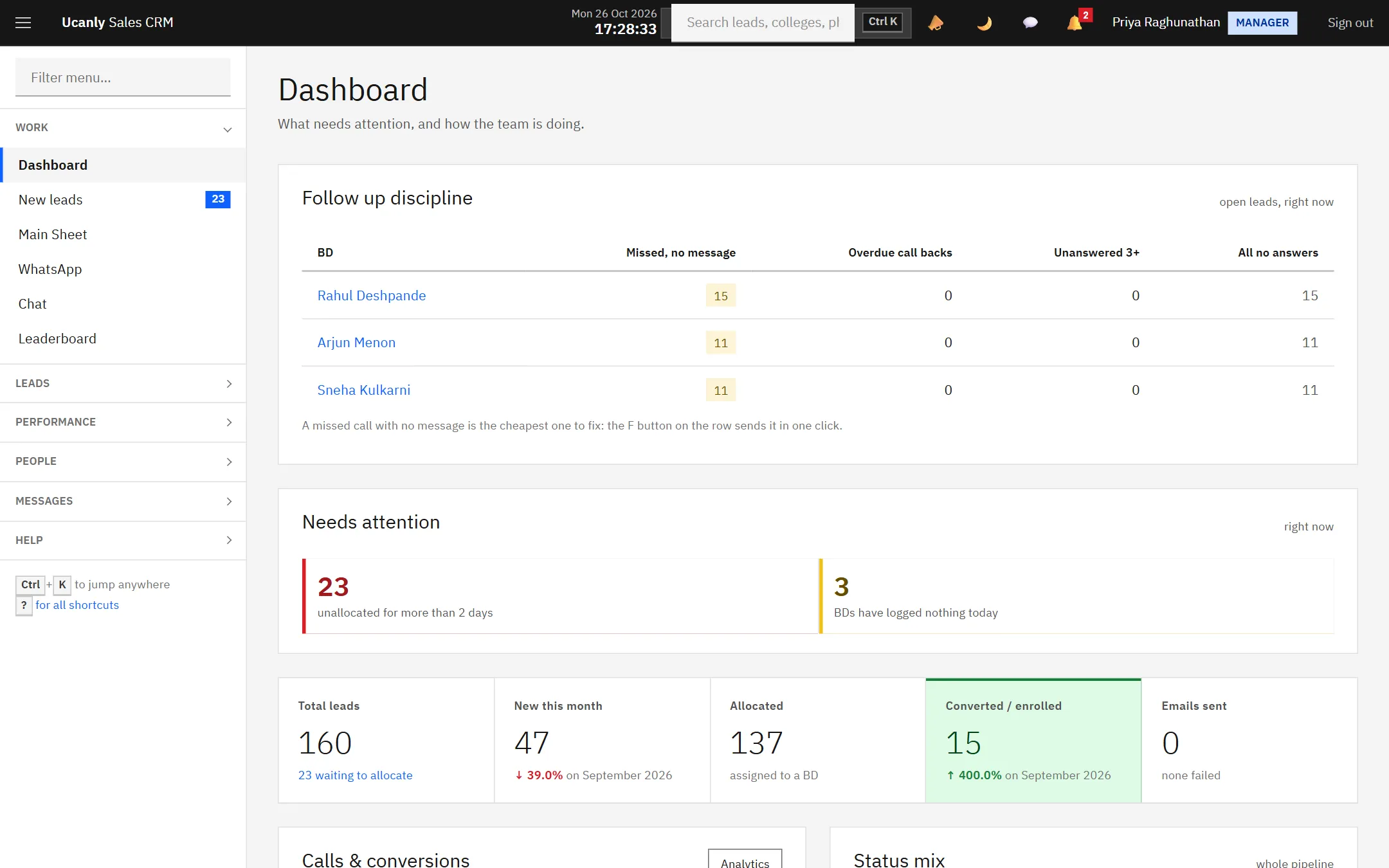
The manager’s morning: who has missed calls without a message, and what has been waiting too long.
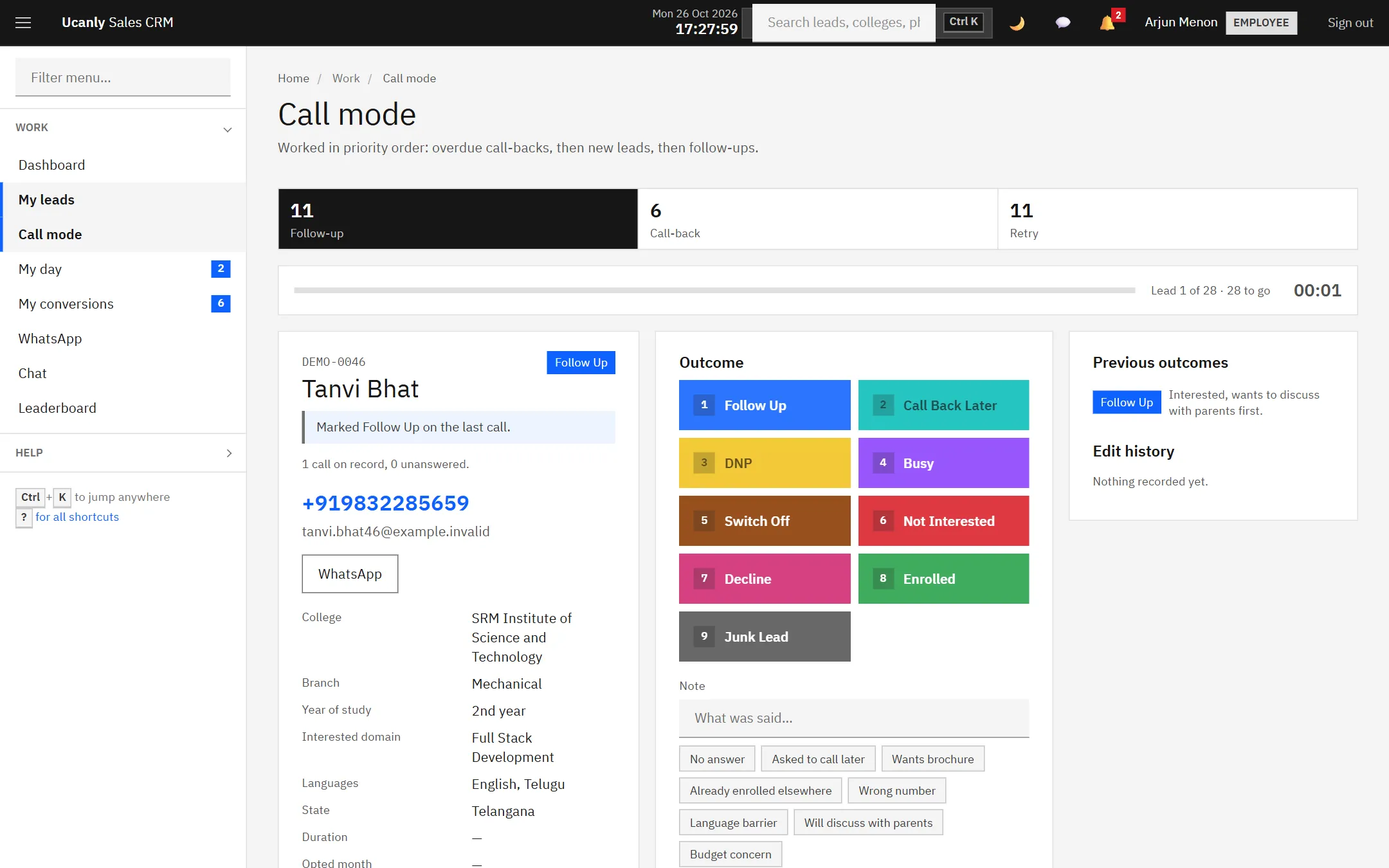
Call mode. One lead at a time, overdue call-backs first, nine outcomes on the number keys.
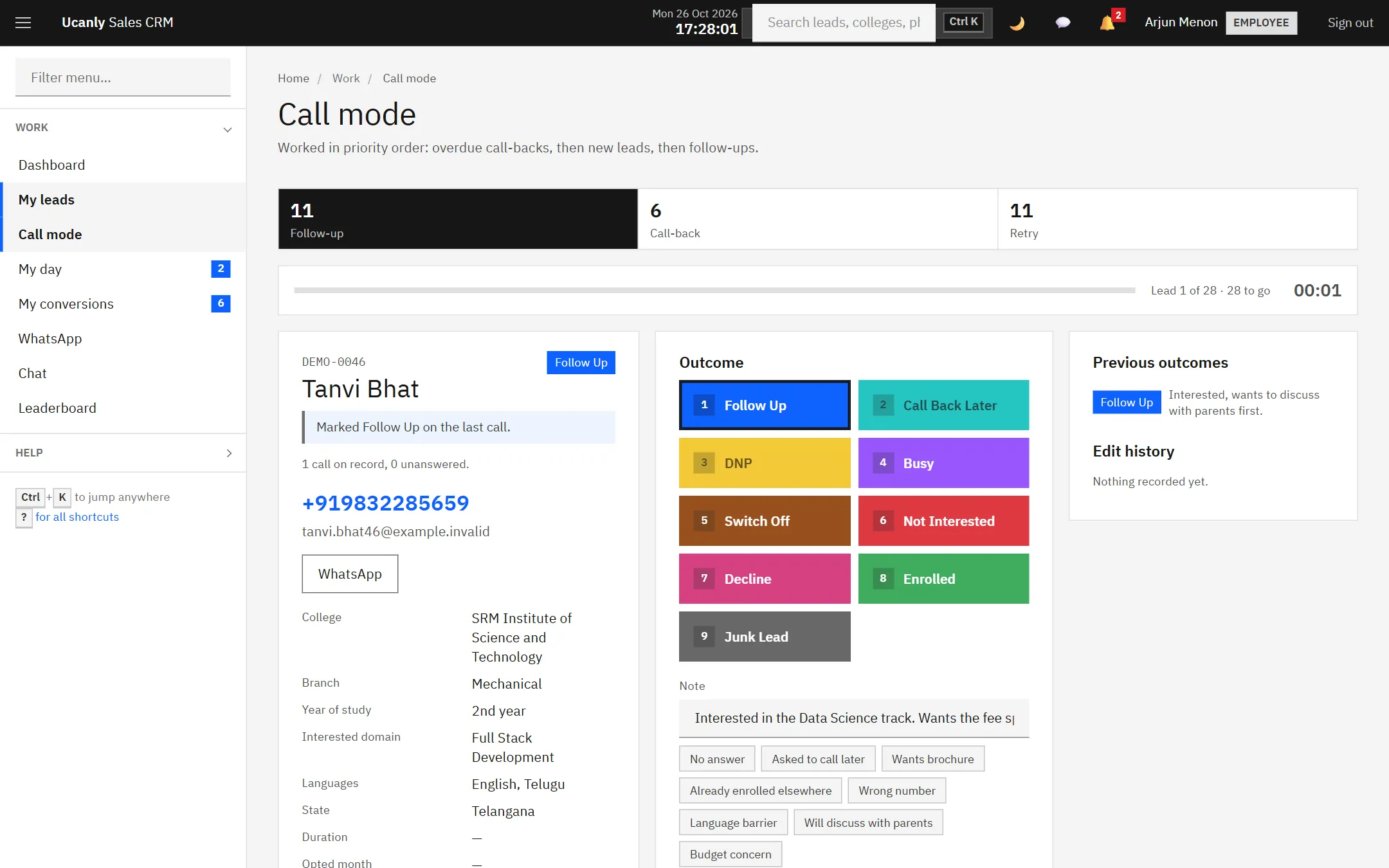
Press 1 for Follow Up, add a note, Enter saves and brings up the next lead.
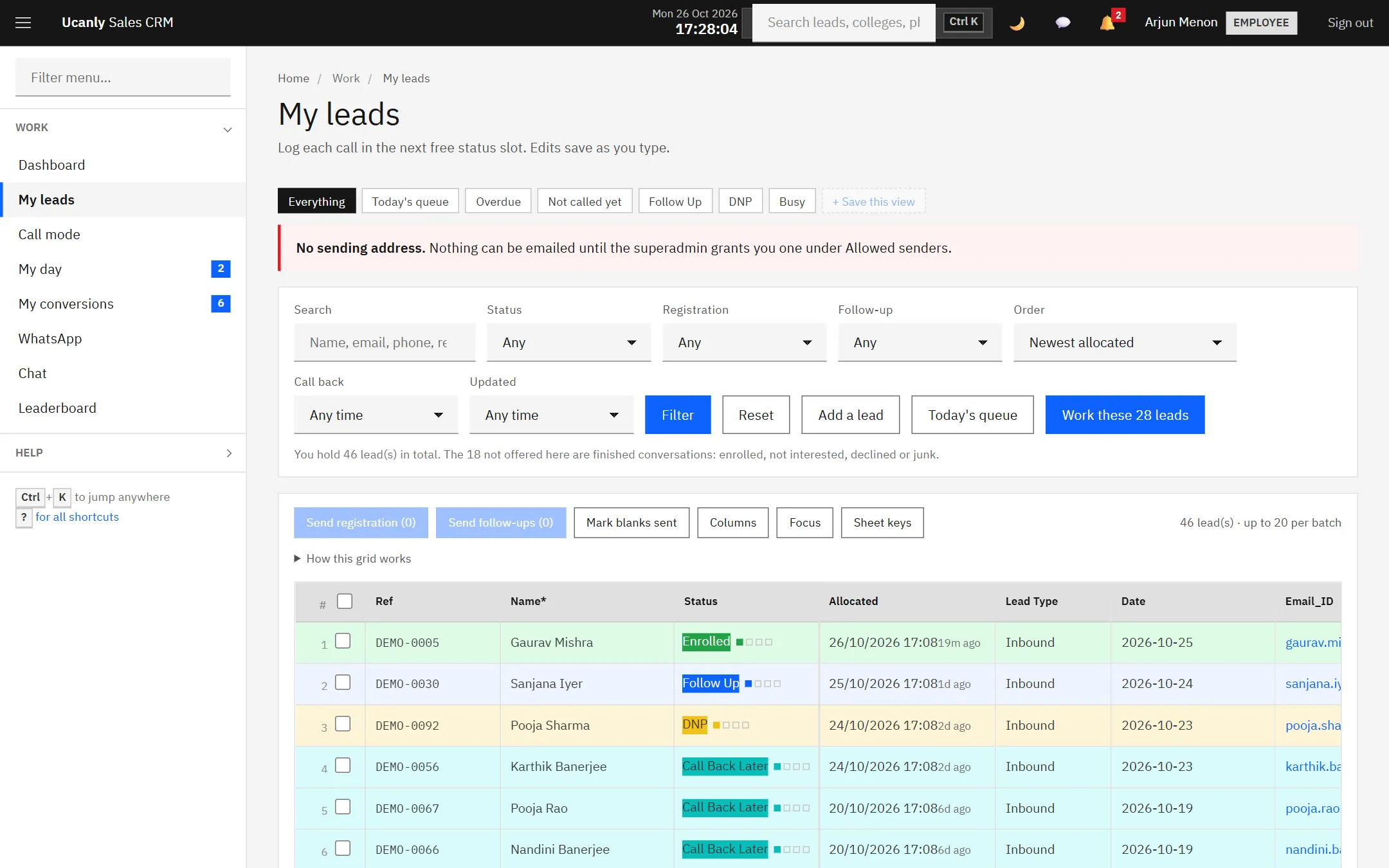
The grid a BD works from. Edits save as you type; rows take the colour of their status.
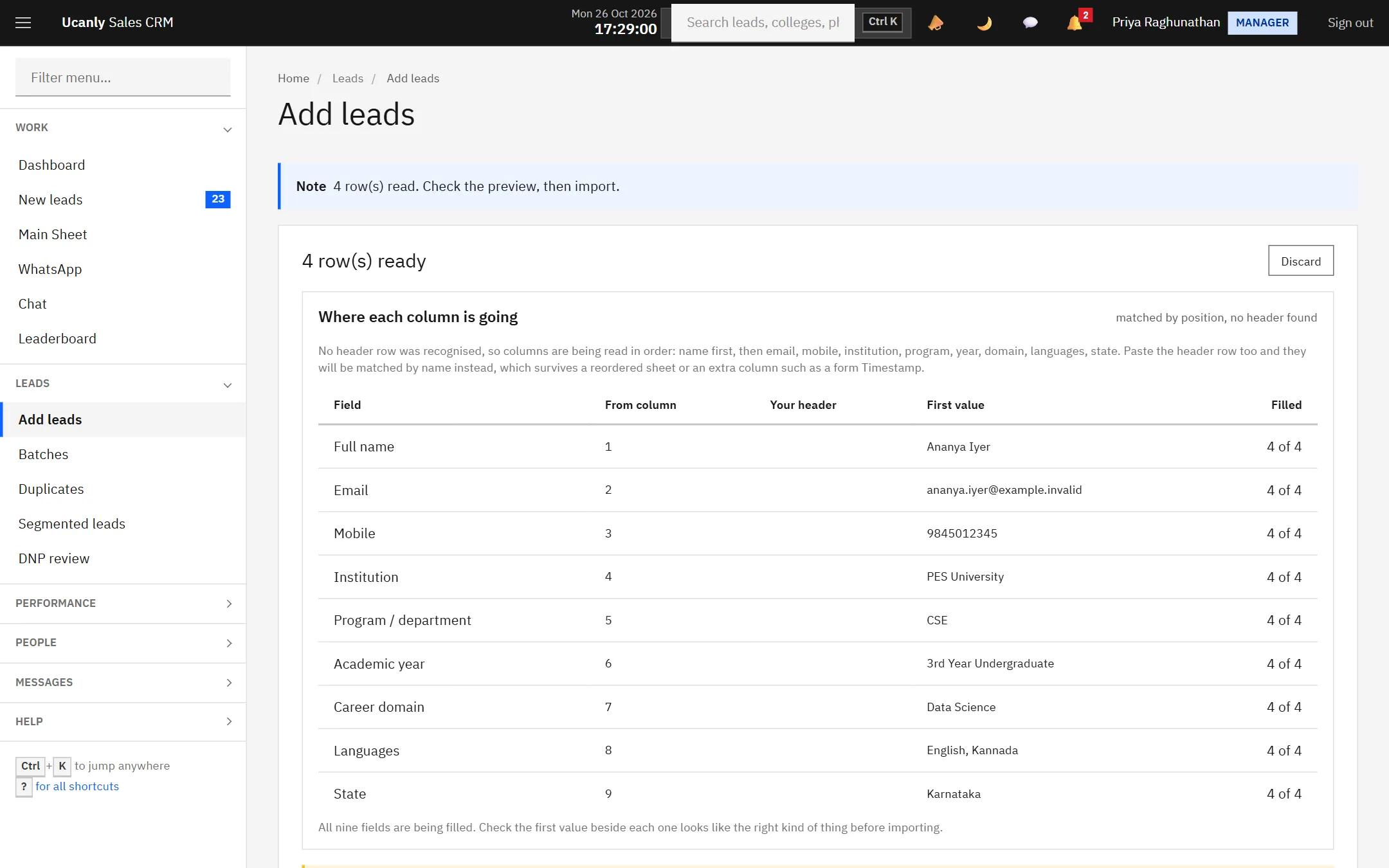
Paste from a sheet and check where every column is going before anything is saved.
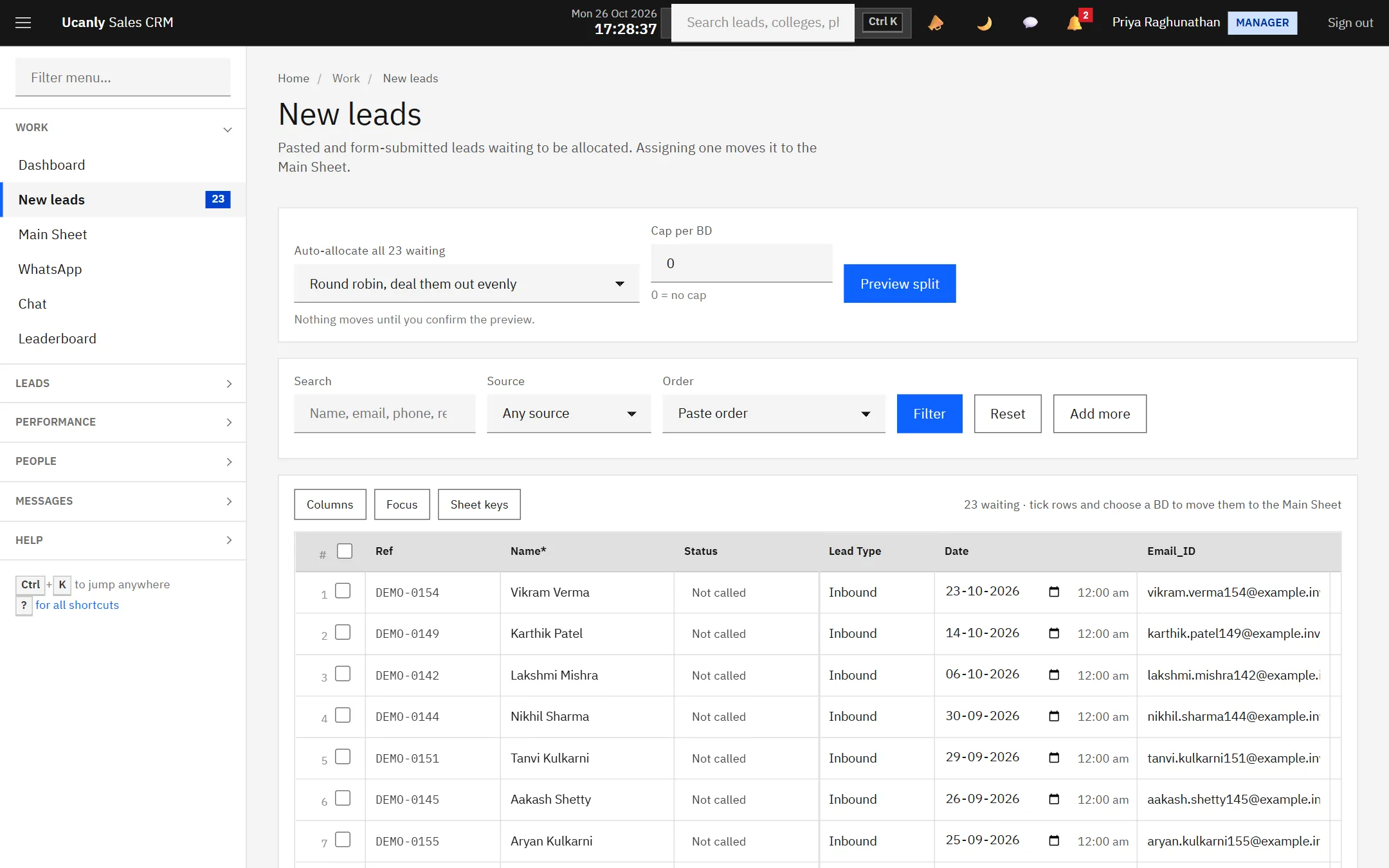
New leads wait here until somebody owns them.
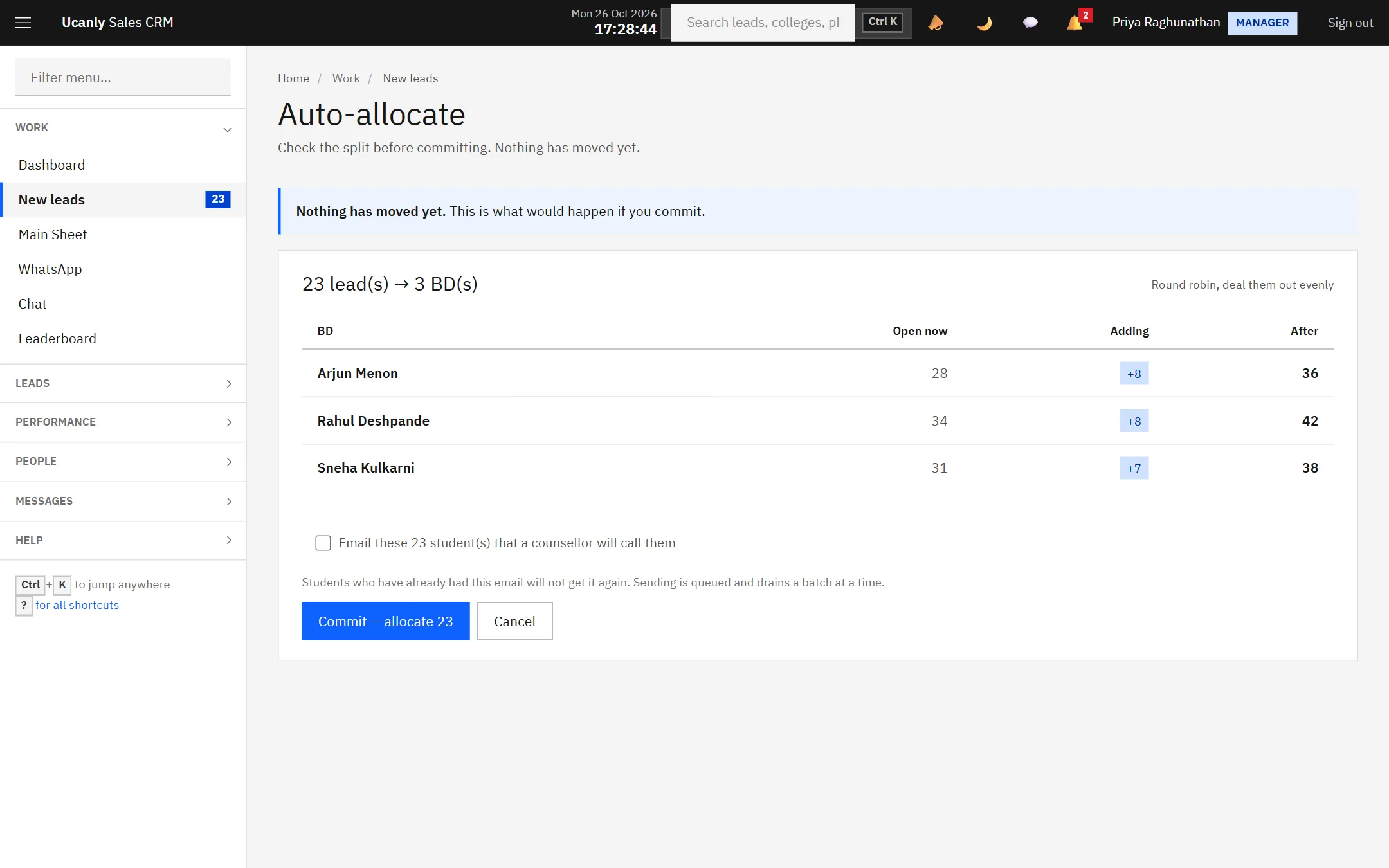
Auto-allocate shows the split first. Nothing moves until the manager commits.
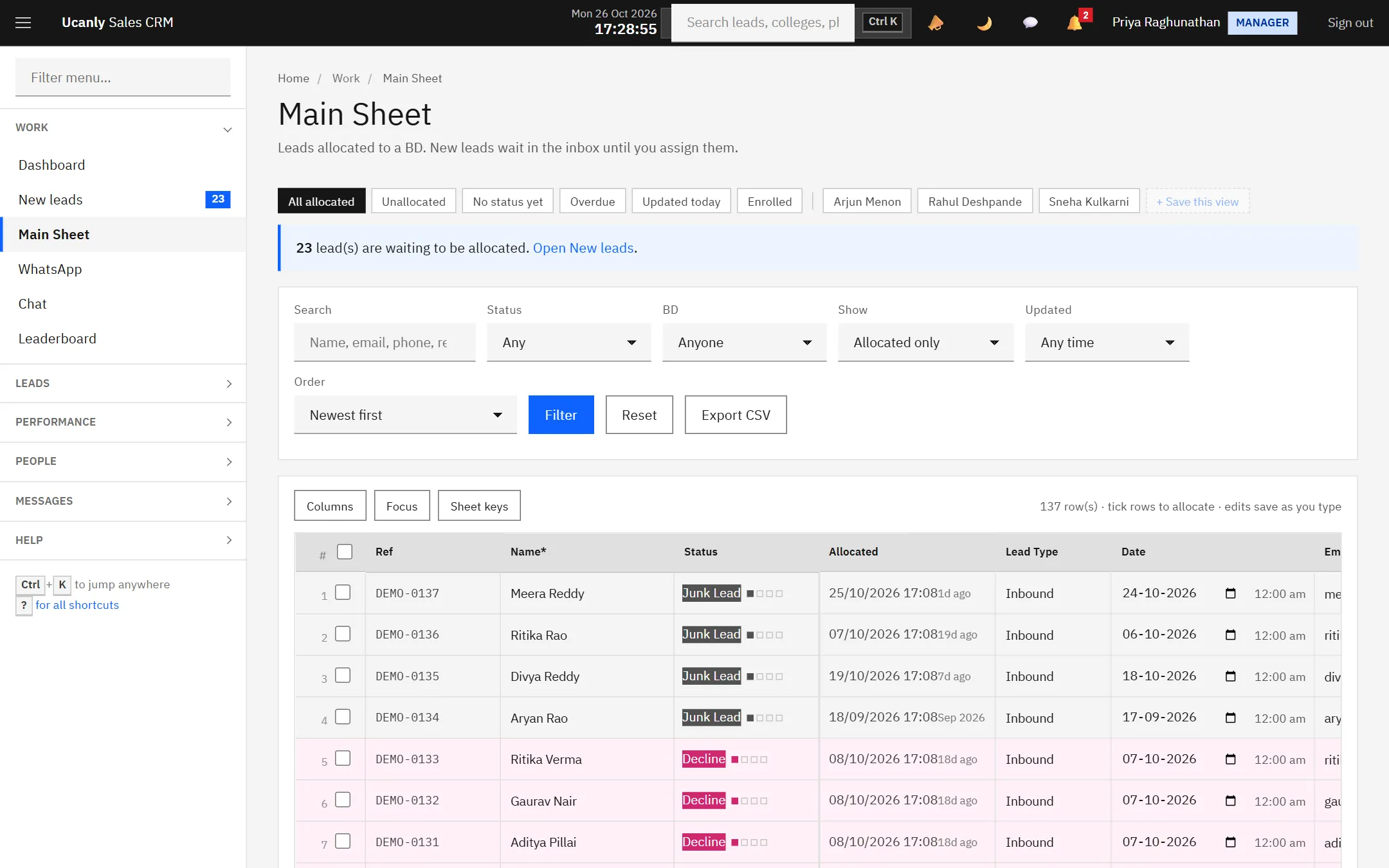
The Main Sheet: every allocated lead, every BD, filters and saved views.
Unanswered calls, by BD and by source, so a pattern is not blamed on a person.
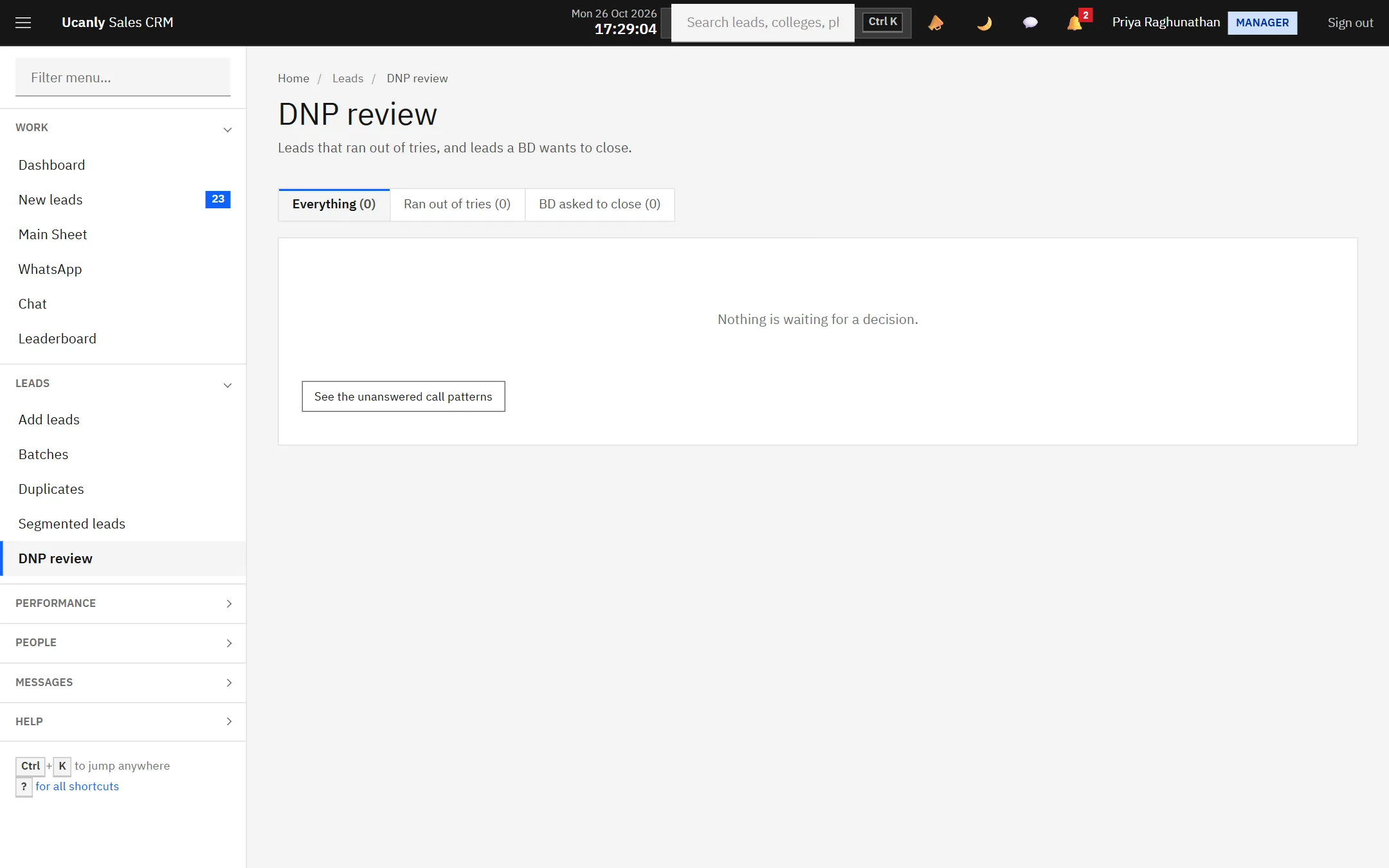
The review queue: send back, reassign, park or close a lead that never answers.
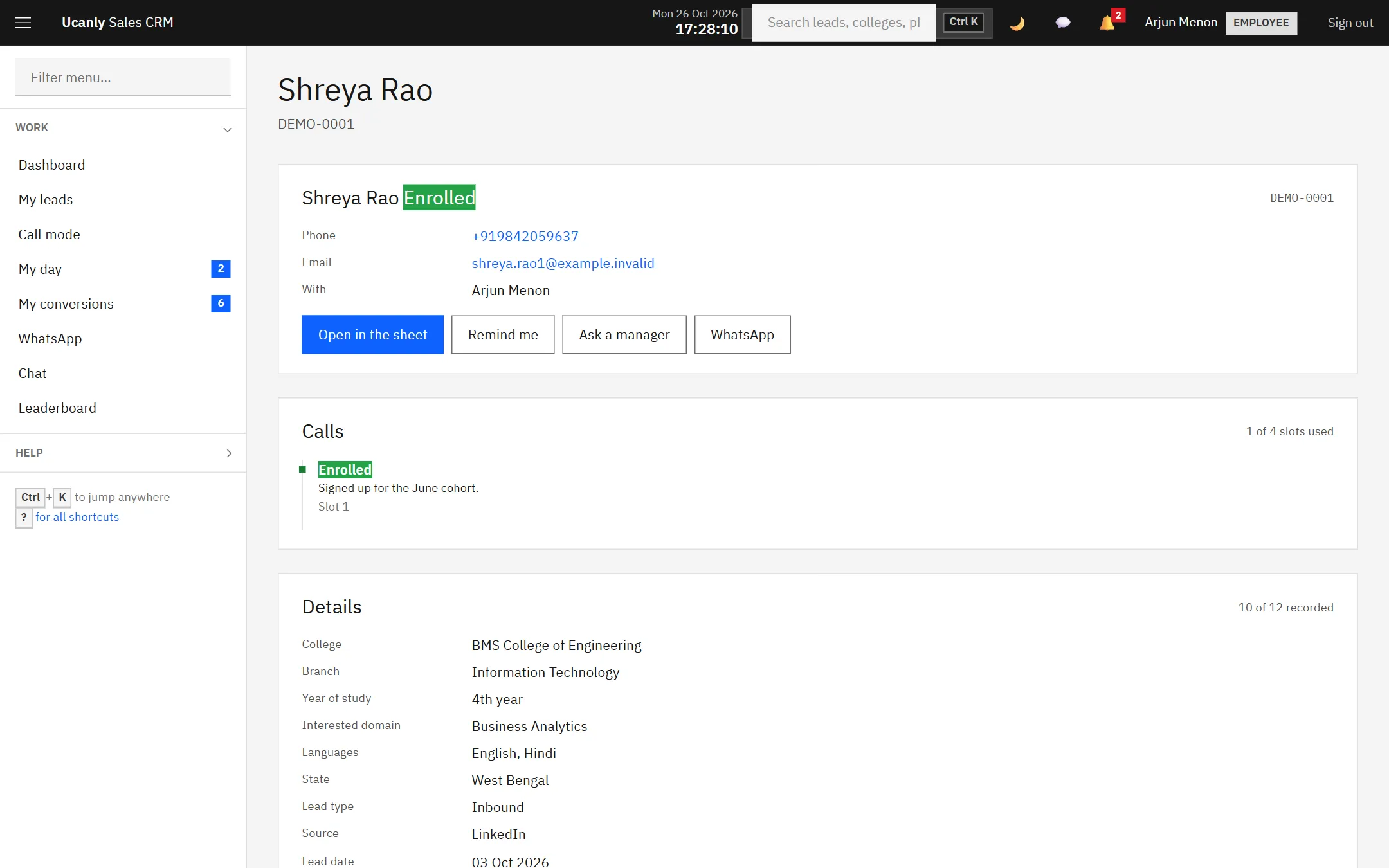
One lead: calls, discussion, details, money and everything that changed.
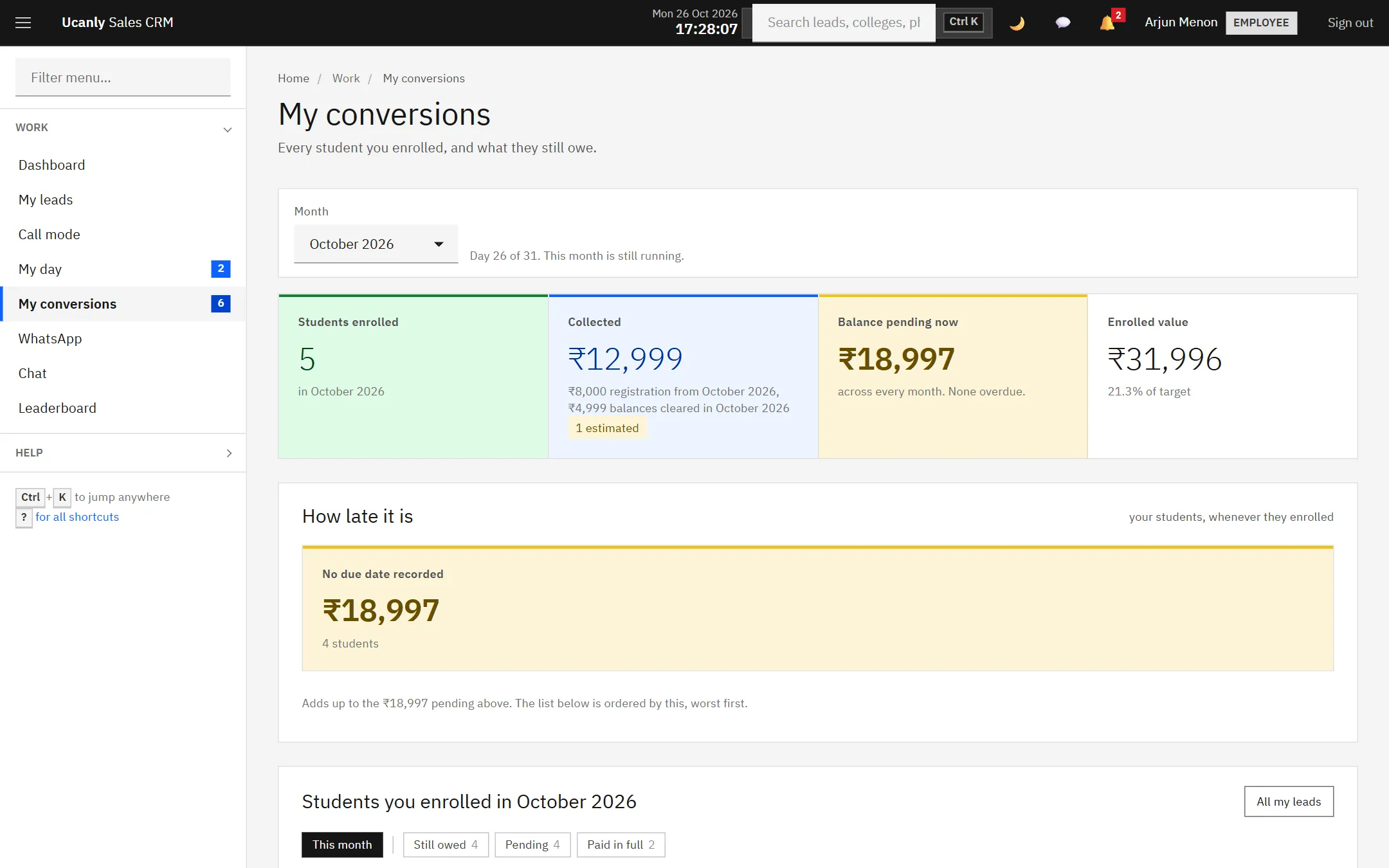
A BD’s enrolments and the balances still to collect.
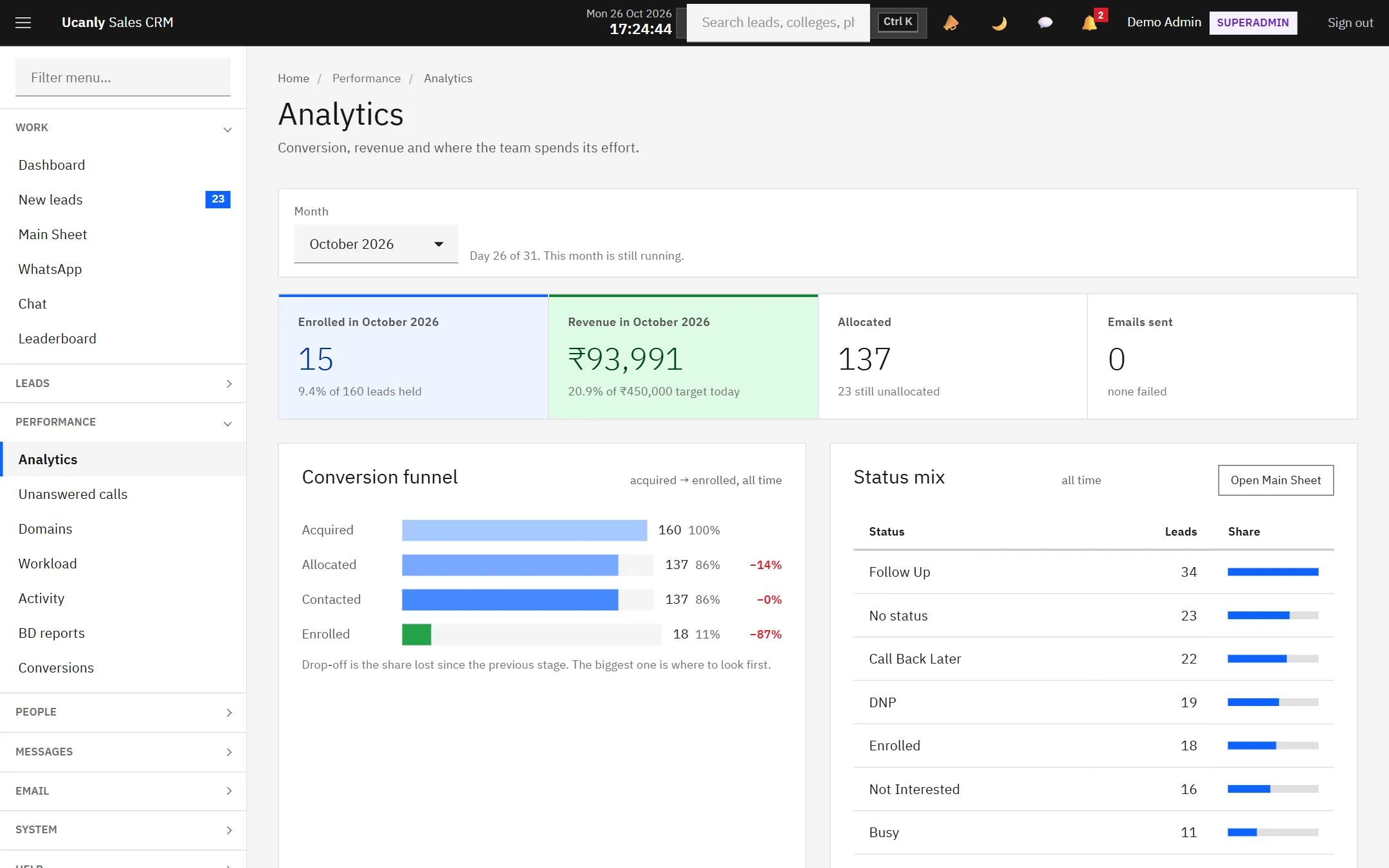
Analytics for the owner: the funnel, revenue against target, and where leads end up.
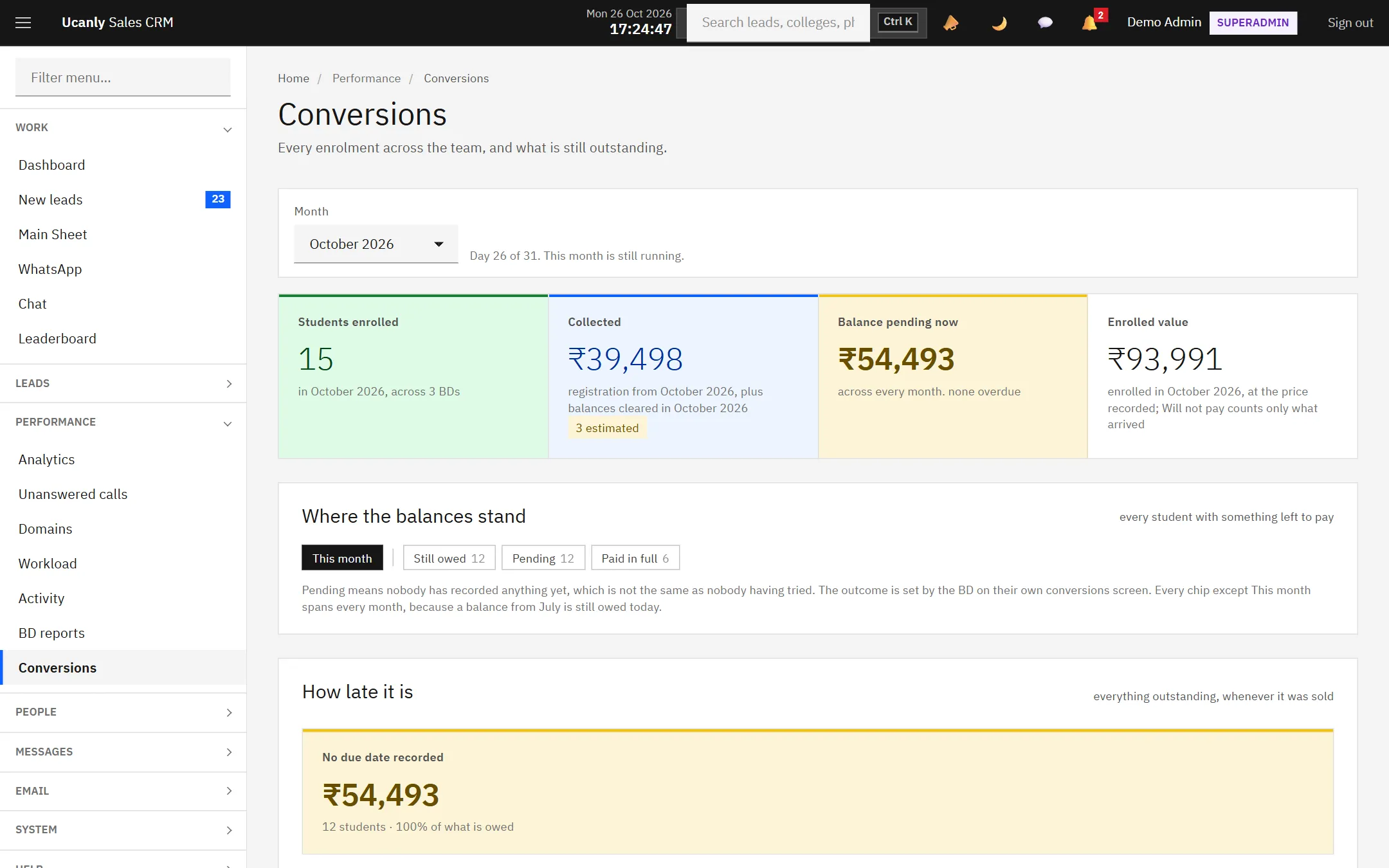
Every enrolment and where its balance stands.
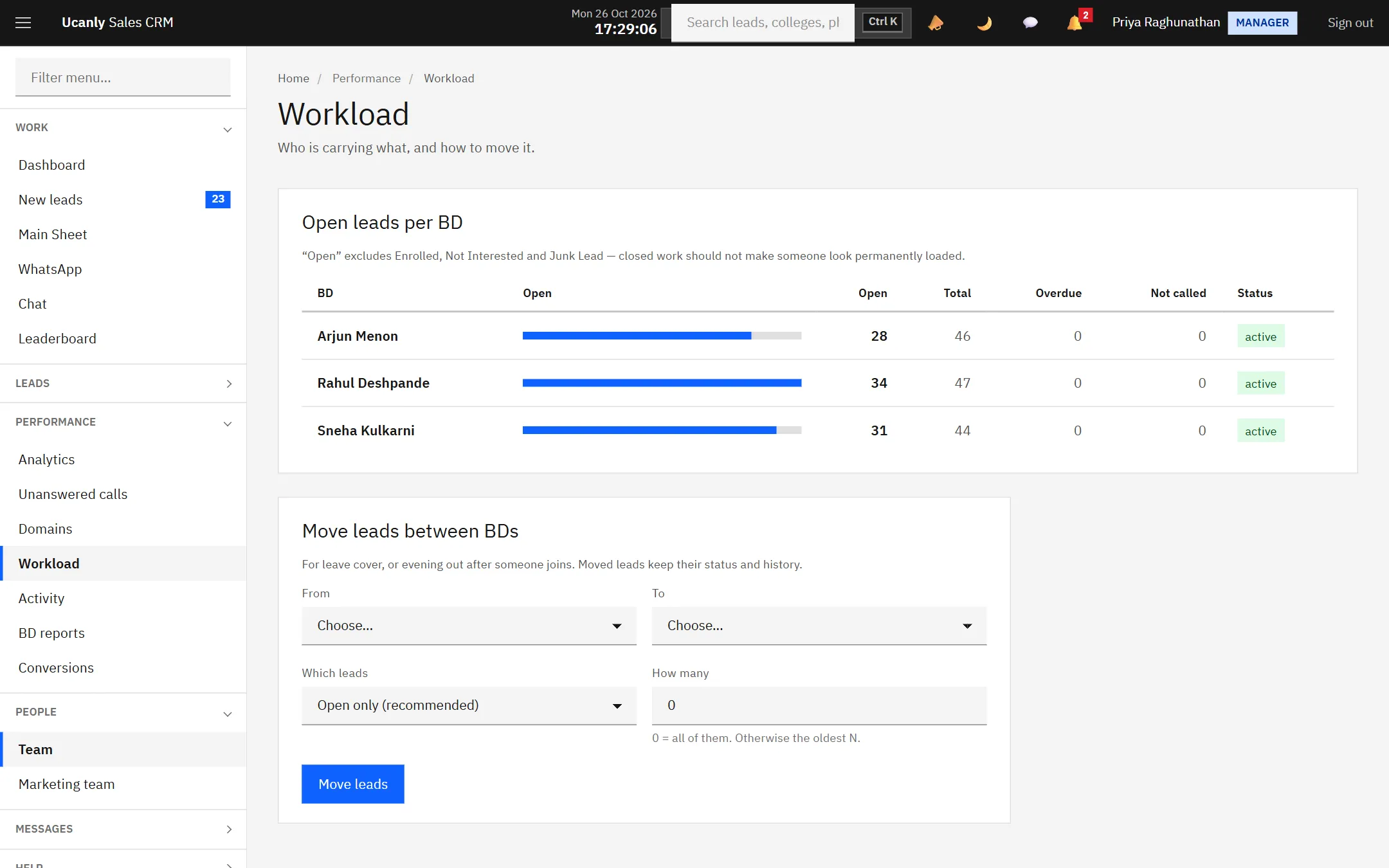
Open leads per BD, and a way to even them out.
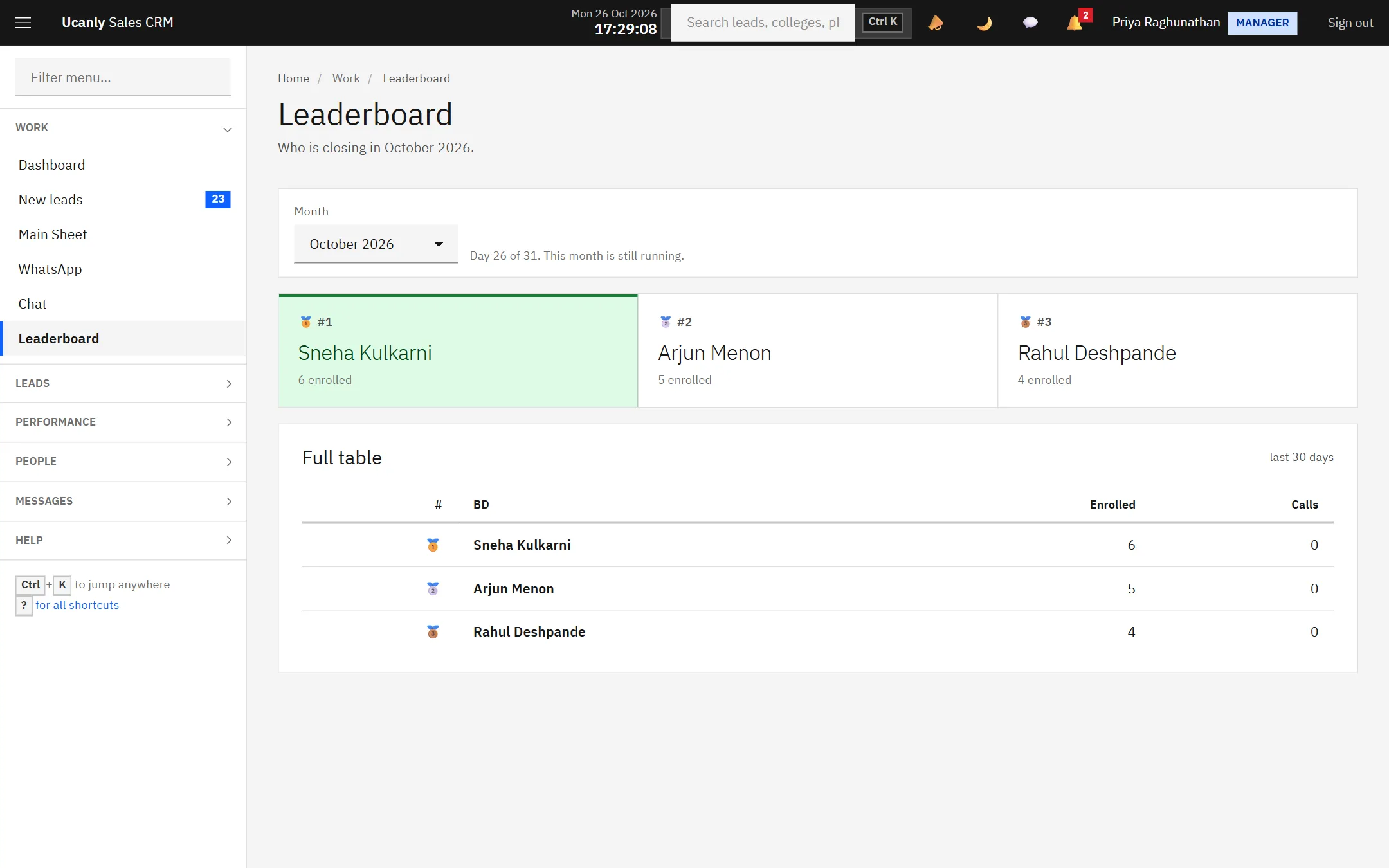
The leaderboard. Money figures are hidden from everyone but the owner.
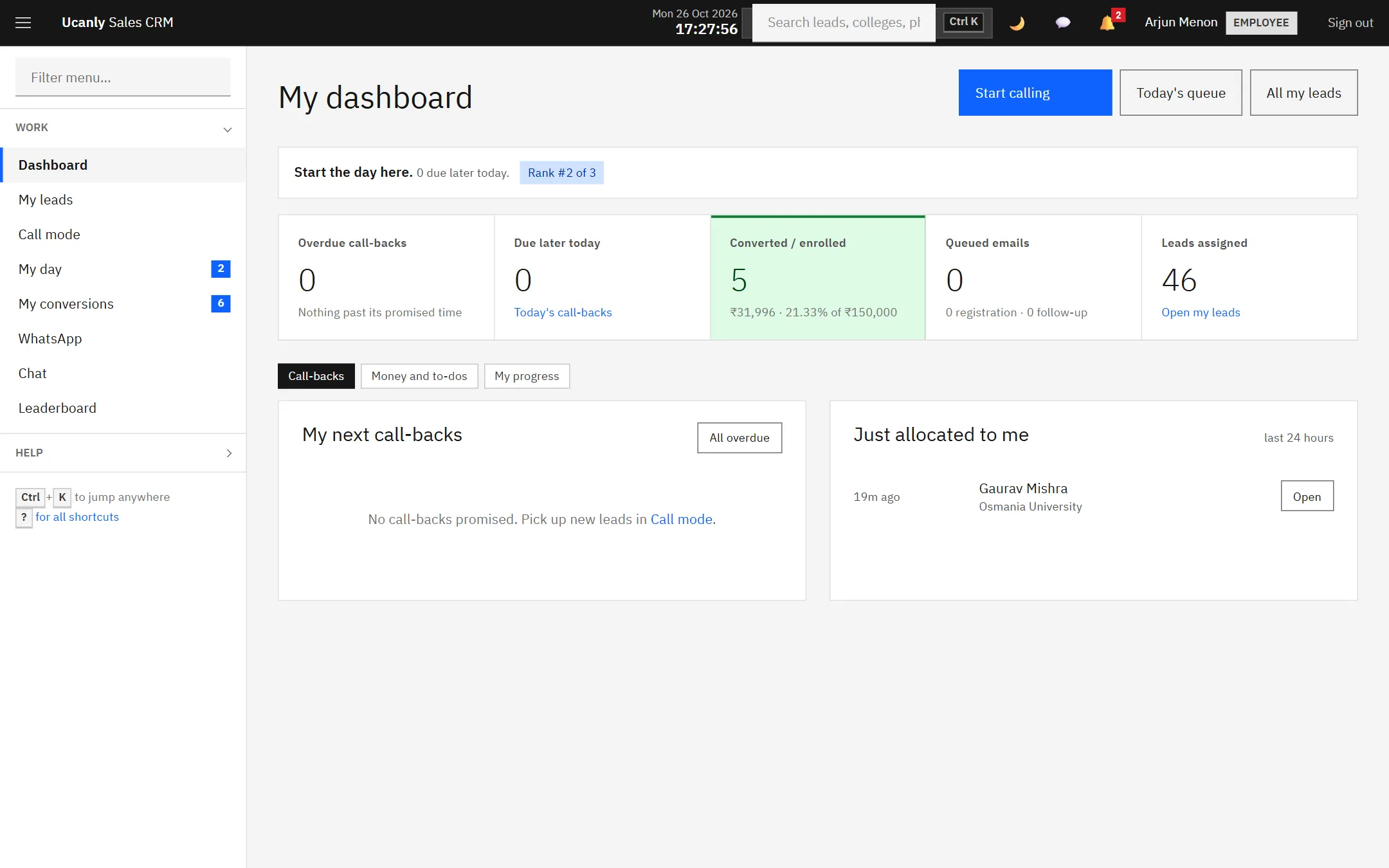
What a BD sees first thing: overdue call-backs, today’s queue, their rank.
Who this is for
An institute outgrowing a sheet
Three or more counsellors working the same enquiry list, and a manager who currently finds out about problems by asking. This is the case it was built for.
A team that calls more than it emails
If most of your conversion happens on the phone, call mode and the call outcomes are the whole product. Mail is there, but it is not the centre.
Anyone who needs to show their working
If you have to evidence who contacted a student and when, whether for a partner, an auditor or a parent, the audit log does that without anybody keeping notes for it.
Questions people actually ask
Next step
Click through a working one.
The demo is loaded with invented leads, counsellors and enrolments. Ask and we will send you a login.