Ucanly Marketing CRM
Email your students actually receive.
Sending mail is the easy half. The half that decides whether it worked is authentication, list hygiene and structure, and this does that work as part of the product rather than leaving it to you.
Deliverability, checked rather than assumed
This is the part we would lead with even if it were not the part we are best at, because it is the part that is usually broken.
The app reads your actual DNS and tells you what is wrong with it: SPF, DKIM and DMARC, with the record it found shown next to the record it expected. Then it scores the draft against the structural signals that push a message into Promotions, which is a different question from spam and is answered mostly by how the message is built rather than what it says. A preflight check verifies that your unsubscribe links resolve somewhere real before a campaign goes out, because a header pointing at the wrong host looks perfect and fails silently.
-
Rates against the real limitsBounce and complaint rates by day, drawn against the limits email providers hold senders to.
-
Health per sending identitySo one bad address does not hide behind the others.
-
Spam signals before launchThe draft is checked for the patterns that get mail filtered, and every link in it is tested.
Deliverability
Bounces, complaints and DNS for the domains this account sends from
Sent
120addresses, last 30 daysSuppressed
00 unsubscribedComplaint rate
0.000%under 0.1%Bounce rate
0.000%under 5%DNS for ucanly.comCheck now
| Record | Found | Expected | Result |
|---|---|---|---|
| SPF | Your sending service is authorised | Sending service listed | Pass |
| DKIM | 3 signing keys published | All 3 signing keys | Pass |
| DMARC | Policy: monitor only | Quarantine or reject | Warning |
Checked just now. The result is kept for six hours.
Health per sending identitylast 30 days
| Identity | Sent | Bounces | Complaints |
|---|---|---|---|
| Ucanly Admissions admissions@ucanly.com | 60 | 0 | 0 |
| Ucanly Careers careers@ucanly.com | 60 | 0 | 0 |
Contacts, lists and segments
Contacts come in by CSV with your own columns mapped on the way, and each one carries a stage, tags, lists, a lead score and an activity timeline.
Segments are saved rules rather than saved lists. Combine stage, tag, list, source, email domain, date added, custom fields, lead score and whether someone clicked a tracked link recently. Each group matches all or any of its rules, and the count is worked out again at the moment a campaign launches.
-
Fields you defineAdd your own (course, intake, college, whatever you sort people by) and use them in a segment rule, a template or a report.
-
Segments you can see before you sendBuild from rules, preview exactly who matches, then save it to reuse. No sending to a definition you have not looked at.
-
A stage for each contactLead, contacted, interested, applied, enrolled, or your own names for them, with the history of how each person moved.
-
Suppression that actually holdsChecked when a campaign is queued and again for every message, and an import cannot override it.
Segments
Saved filters · evaluated when you send, never stored as a fixed list
| Segment | Rules | Matches now |
|---|---|---|
| Hot leads — score 40+ or applied | Any of: Lead score at least 40 or Stage is Applied | 48 |
| Unengaged: no clicks in 90 days Built in | No clicks in the last 90 days, after a tracked send | 46 |
New segmentMatches now 205
Name
Group 1
Match all of these rulesStageis any of
Clicked a tracked linkwithin
Add a ruleSave segment
A contact who is unsubscribed or bounced is never included, whatever the rules say.
Campaigns, and what happened to them
Write it, test it against a real inbox, send it, then find out what it did.
Six steps: compose, recipients, senders, review, sending, report. The editor has a live preview, merge fields, reusable approved blocks and a test send. Reports carry what was sent and failed, clicks by link and who clicked, bounces, complaints and unsubscribes, and can resend to anyone who did not click or was not reached.
A campaign can carry a second subject line. A sample goes out first and the rest is held back until somebody picks the winner. Held means held: the remainder costs no worker time and takes no share of your send rate while it waits.
-
Spread across your sendersOne campaign can go out from several verified identities, shared between them.
-
Approval above a size you setLarge sends wait for someone allowed to approve them, and show on the calendar meanwhile.
-
Compare campaignsTwo to four side by side, so you can tell which subject or send time actually did better.
- 1Compose
- 2Recipients
- 3Senders
- 4Review
- 5Sending
- 6Report
Compose
Write the message. The preview on the right is the real email, rendered the same way a recipient will receive it.
Inbox check 41Send testSave as template
Email subject
Email body
BIU{ } FieldBlock
{{FIRST_NAME}}
PREVIEW • LIVEDesktopPhone
Write a subject and a body and the email appears here.
Ucanly · BTM Layout, Bengaluru
Unsubscribe
- 1Compose
- 2Recipients
- 3Senders
- 4Review
- 5Sending
- 6Report
Recipients
Who this goes to, and how fast it leaves. Anyone on the suppression list is removed automatically.
Recipients
PasteChoose a listUse a segmentPick tags
Segment
- Hot leads — score 40+ or applied48 now
- Warm — interested or applied75 now
- Unengaged: no clicks in 90 days46 now
Will receive
0evaluated again at launchSuppressed
0unsubscribed or bouncedPace
14/srate limit from SettingsContinue
- 1Compose
- 2Recipients
- 3Senders
- 4Review
- 5Sending
- 6Report
Review
Campaign
Your seat in the November cohort
Segment: Warm — interested or applied · 75
Sender breakdown
Ucanly Admissions 38
Ucanly Careers 37
Schedule & unsubscribe
Send now
One-click unsubscribe header on every message
Tracking
Click tracking on
Links rewritten through your own short-link domain
Deliverability
- SPFSending service authorised for ucanly.comPass
- DKIMSigning keys found for ucanly.comPass
- DMARCPolicy published: quarantinePass
Launch
- 1Compose
- 2Recipients
- 3Senders
- 4Review
- 5Sending
- 6Report
Sending
Initialising…
0 / 75 emails00:00
Sent
0Failed
0Remaining
75Per sec
0| Sender | Sent | Share |
|---|---|---|
| Ucanly Admissions admissions@ucanly.com | 0 | 51% |
| Ucanly Careers careers@ucanly.com | 0 | 49% |
Sending runs in the background. You can close this tab; it carries on and the report fills in as it goes.
Campaigns › Your seat in the November cohort
Your seat in the November cohort Sent
Sent
0100% of attemptsClicked
0of those sentUnsubscribed
0opted outHard bounces
0suppressed automaticallyComplaints
0marked as spamClicks by link
| Destination | Short code | Clicks | Unique |
|---|---|---|---|
| Finish your application ucanly.com/apply | /r/nov-apply | 0 | 0 |
Who clicked
| Ananya Iyer ananya.iyer@demo.ucanly.invalid | 2 | 27 Oct 11:52 |
| Rohit Verma rohit.v@demo.ucanly.invalid | 1 | 27 Oct 12:06 |
| Meghana Rao meghana.rao@demo.ucanly.invalid | 1 | 27 Oct 12:31 |
Writing help, with guard rails
Writing Studio drafts academic and business emails from a short brief, with AI assistance you switch on and a monthly usage limit you set.
What comes back is checked before you see it: against your terminology list, against the links you allow, and for claims that were not in your brief. With the assistant switched off, the rest of the product works exactly the same.
-
Write, then refineImprove, simplify, shorten, expand, make more formal, or generate alternatives.
-
Check before sendingProofread, check tone, and get subject line suggestions.
-
Your approved wordingA terminology list of approved words, words to avoid and words to use carefully.
Automations, and a queue you can watch
An automation is a trigger and a list of steps. Each step is a template and a delay, and each one sends as an ordinary campaign you can open and read.
People leave a sequence when they unsubscribe, and you can also have them leave when they click or reach a stage, so nobody is still being chased after they have applied.
-
Triggers that are easy to reason aboutAdded to a list, tagged, moved into a stage, sent a campaign, clicked, did not click, or added by hand.
-
Switching one on does not mail everybodyActivation records a moment, and the sweep only considers what happened after it. Turning on a welcome sequence cannot blast your entire back catalogue.
-
Sending survives a closed laptopA queue and a worker handle throttling and retries, so a large campaign does not depend on a browser tab.
-
Live operationsEvery campaign sending right now, how fast, and anything stuck, with an activity log behind it.
Automations › Welcome sequence
Welcome sequence Off
Moved into stage interested · 0 in progress · 0 finished
Turn on
When you turn it on, enrollment starts from that moment — people already in the stage are not mailed.
On since 27 Oct 2026, 11:44. Only people who move into the stage after this are enrolled.
Trigger and steps
Trigger
Moved into stageWhich stage
interested- Step 1 · straight awayWelcome and next steps
- Step 2 · 2 days laterDeadline reminder
- Step 3 · 3 days laterEligibility check
Anyone who clicks, unsubscribes or moves on to Applied leaves the sequence.
Where the mail goes out
Mail is sent from your own domain and your own sending account, so the reputation you build belongs to you. Click tracking, when you turn it on, runs through a built-in link shortener on your own domain, so the links in your mail are yours rather than a third party’s. There is no open-tracking pixel.
- Your sending reputation. Your sending account, your limits, your domain. Nobody else’s campaign affects your delivery.
- One-click unsubscribe. Required of bulk senders by Gmail and Yahoo since February 2024.
- Rate limiting and throttling. Configurable per second and per batch, so you stay inside your sending limits.
- Bounces and complaints feed back. Hard bounces and spam reports land on the suppression list automatically.
Who this is for
Anyone paying per contact
Per-seat and per-contact pricing punishes you for having a big list, which is the opposite of what you want. This is your own installation, so a bigger list does not mean a bigger bill from us.
Anyone whose mail is not landing
If replies and clicks fell off a cliff and nobody can tell you why, the DNS checks and the spam-signal scoring are the reason to look at this.
Anyone who has to prove consent
Suppression, unsubscribe records and per-contact activity are kept in your own installation, so an audit is a report rather than a support ticket.
Real screens
Screenshots of the Marketing CRM running on its own demo data. Every contact and figure in them was invented by the demo seed, and the demo cannot send to a real address.
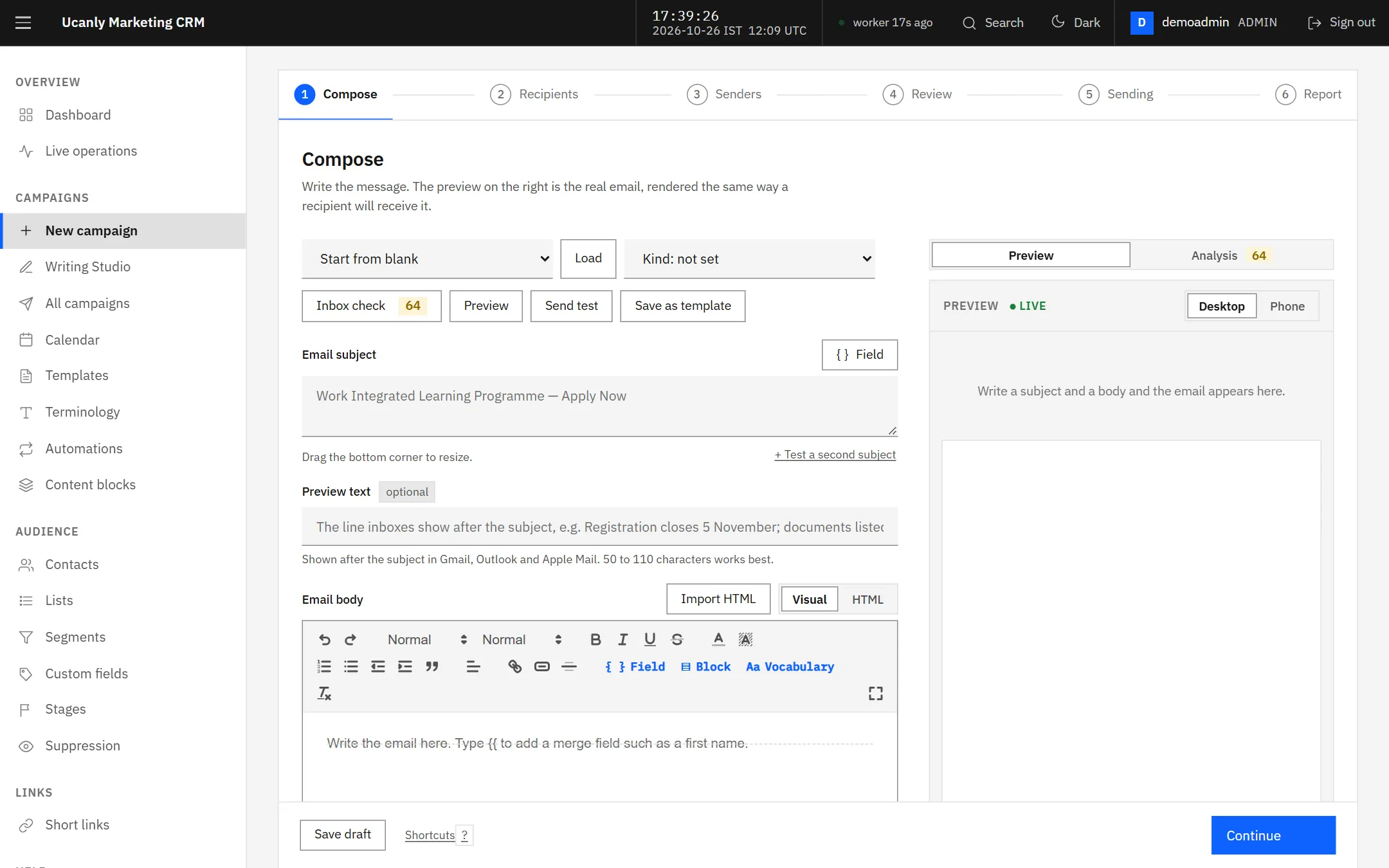
Six steps from a blank page to a report. Compose has a live preview and an inbox check.
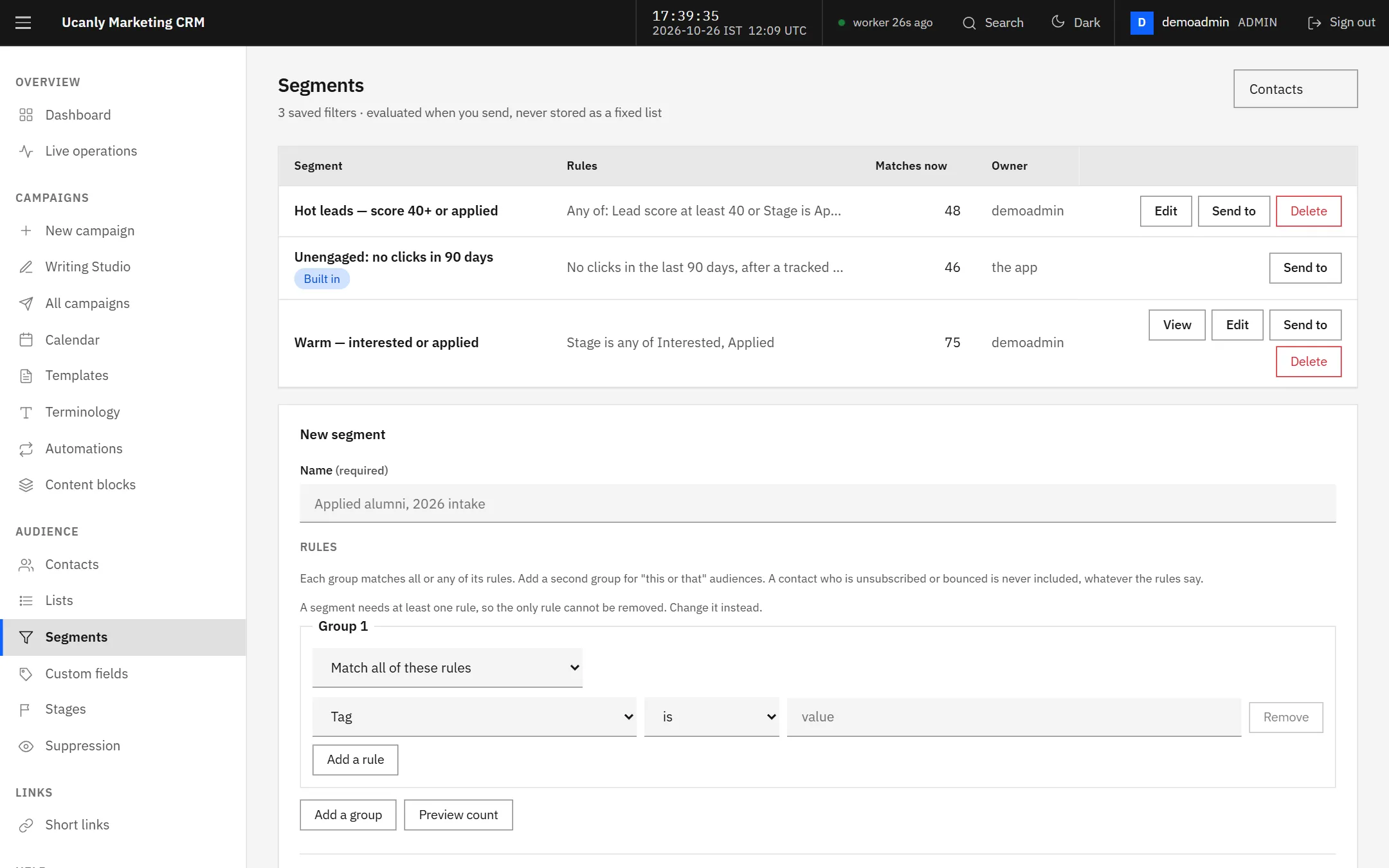
Segments are saved rules, counted again at the moment you send.
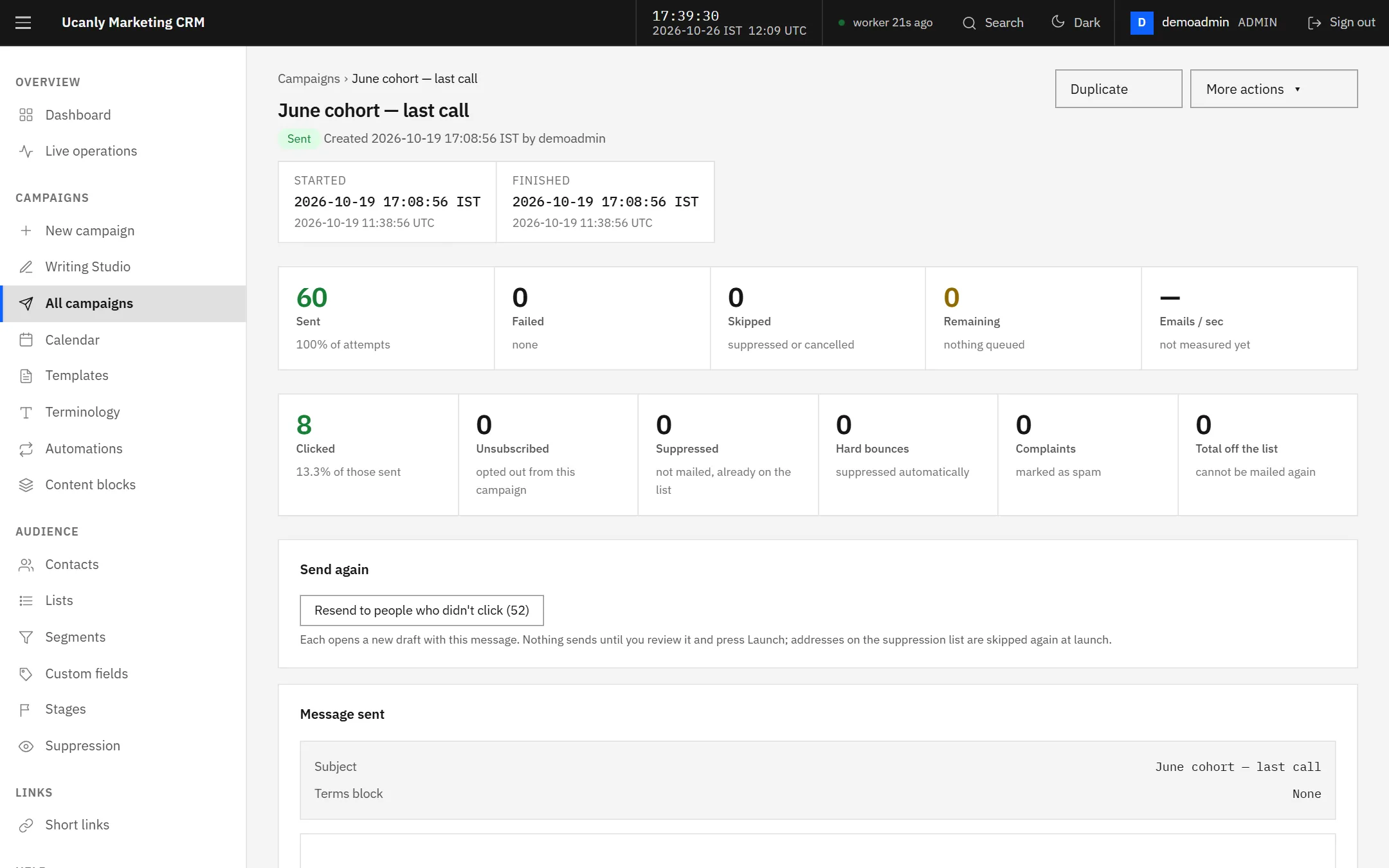
A campaign report: what was sent, what failed, who clicked, who left.
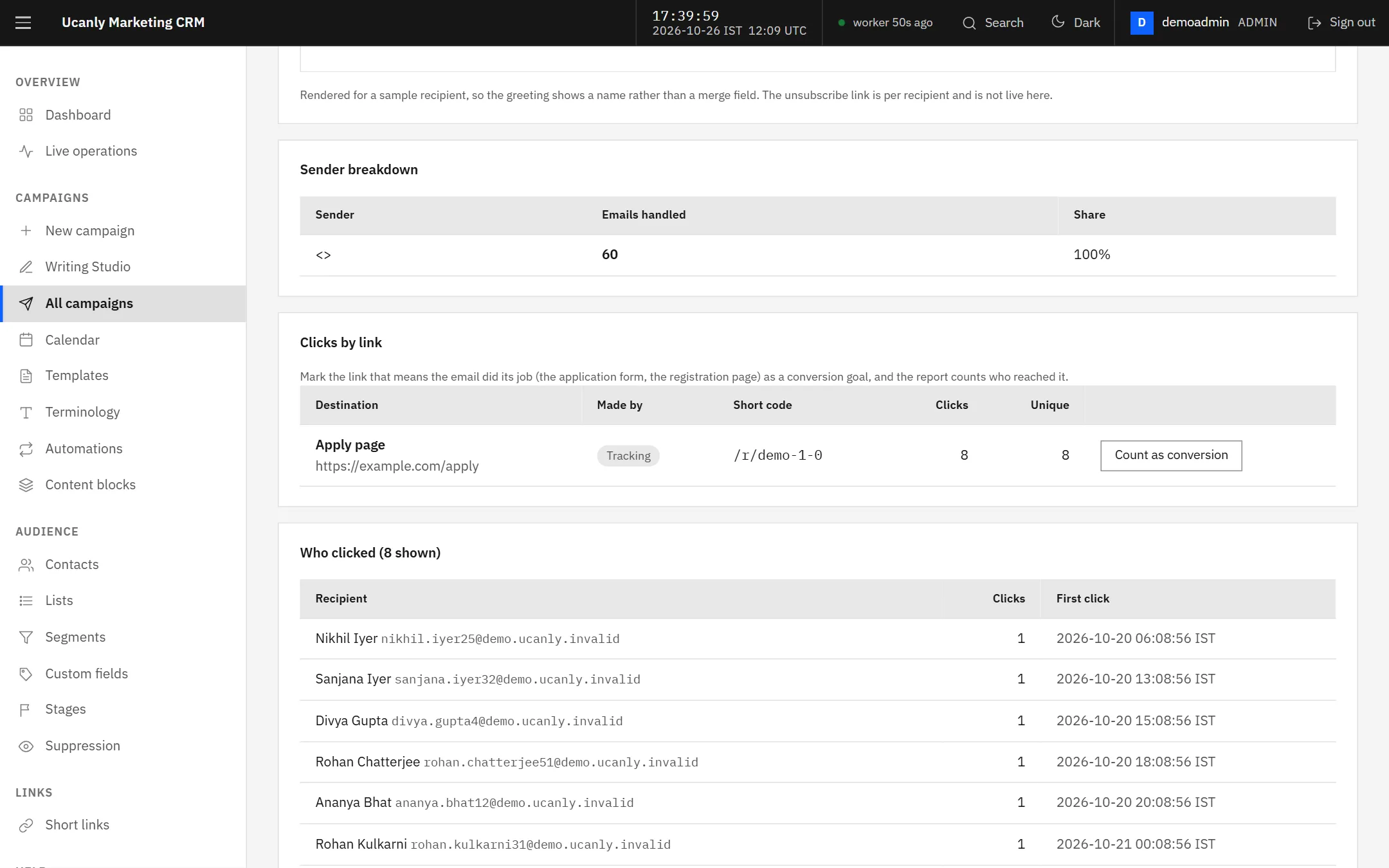
Clicks by link and who clicked, from links tracked on your own domain.
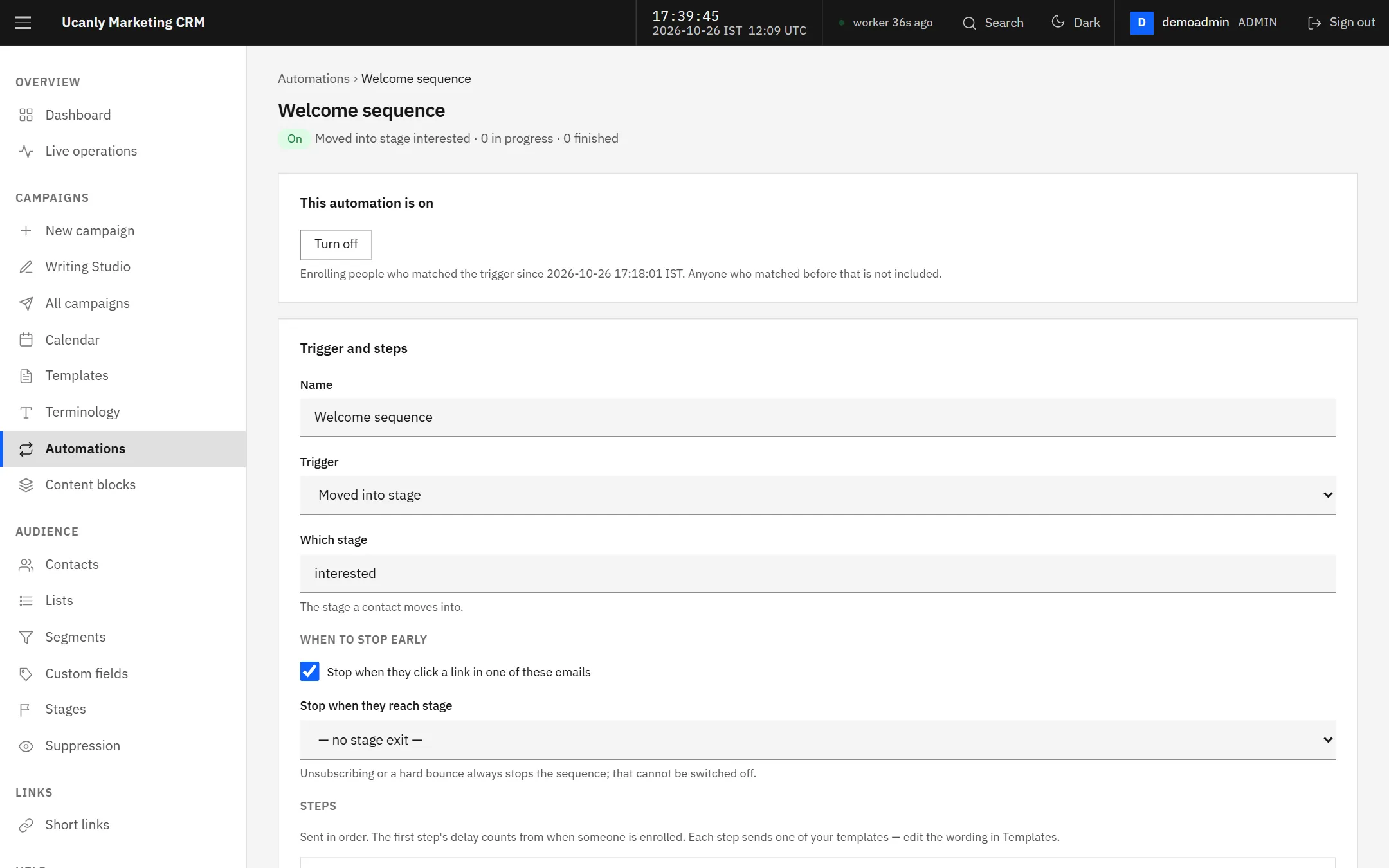
An automation: a trigger, then templates on a delay. It only enrols people from the moment it is switched on.
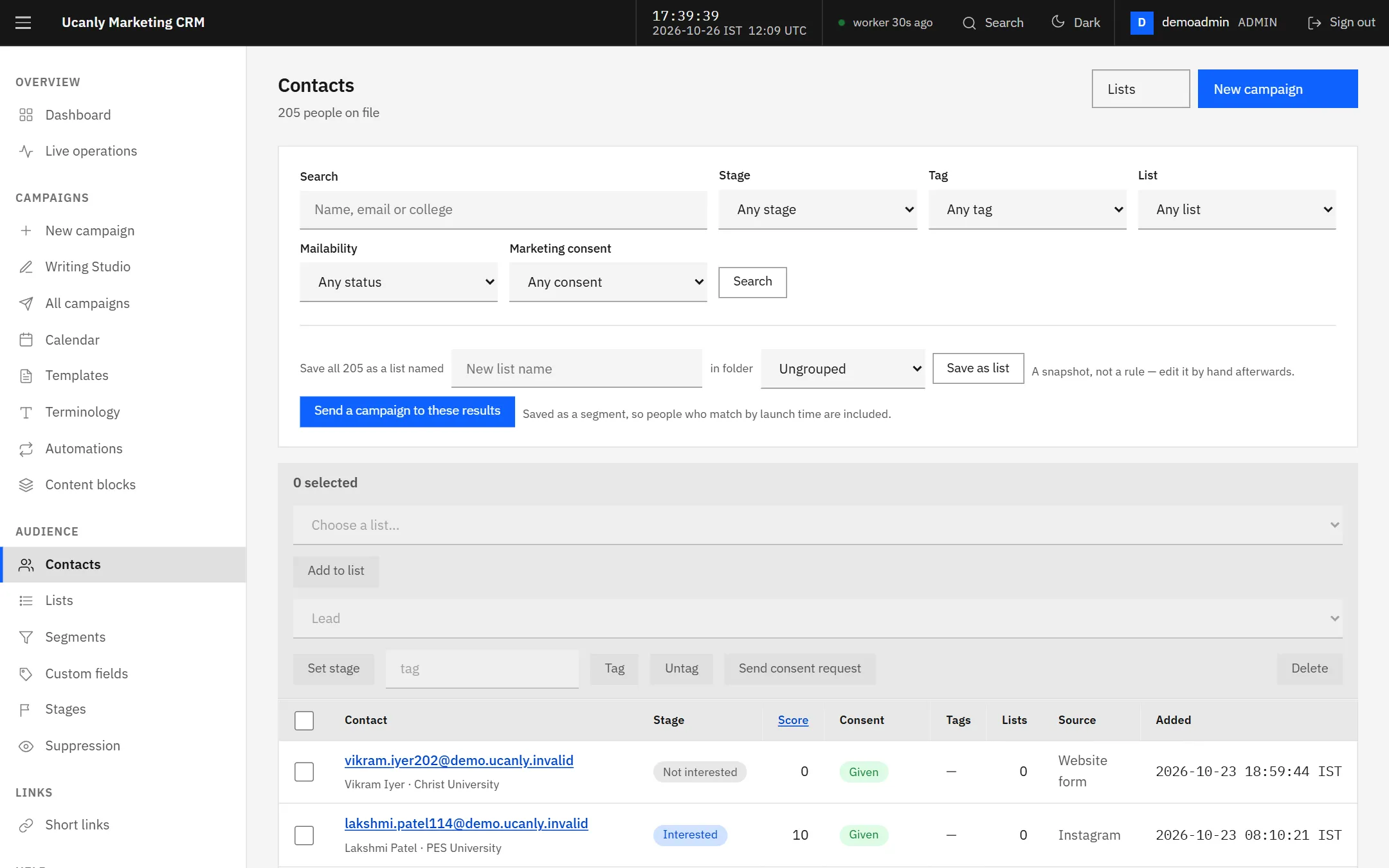
Contacts with stages, tags and custom fields, imported from CSV.
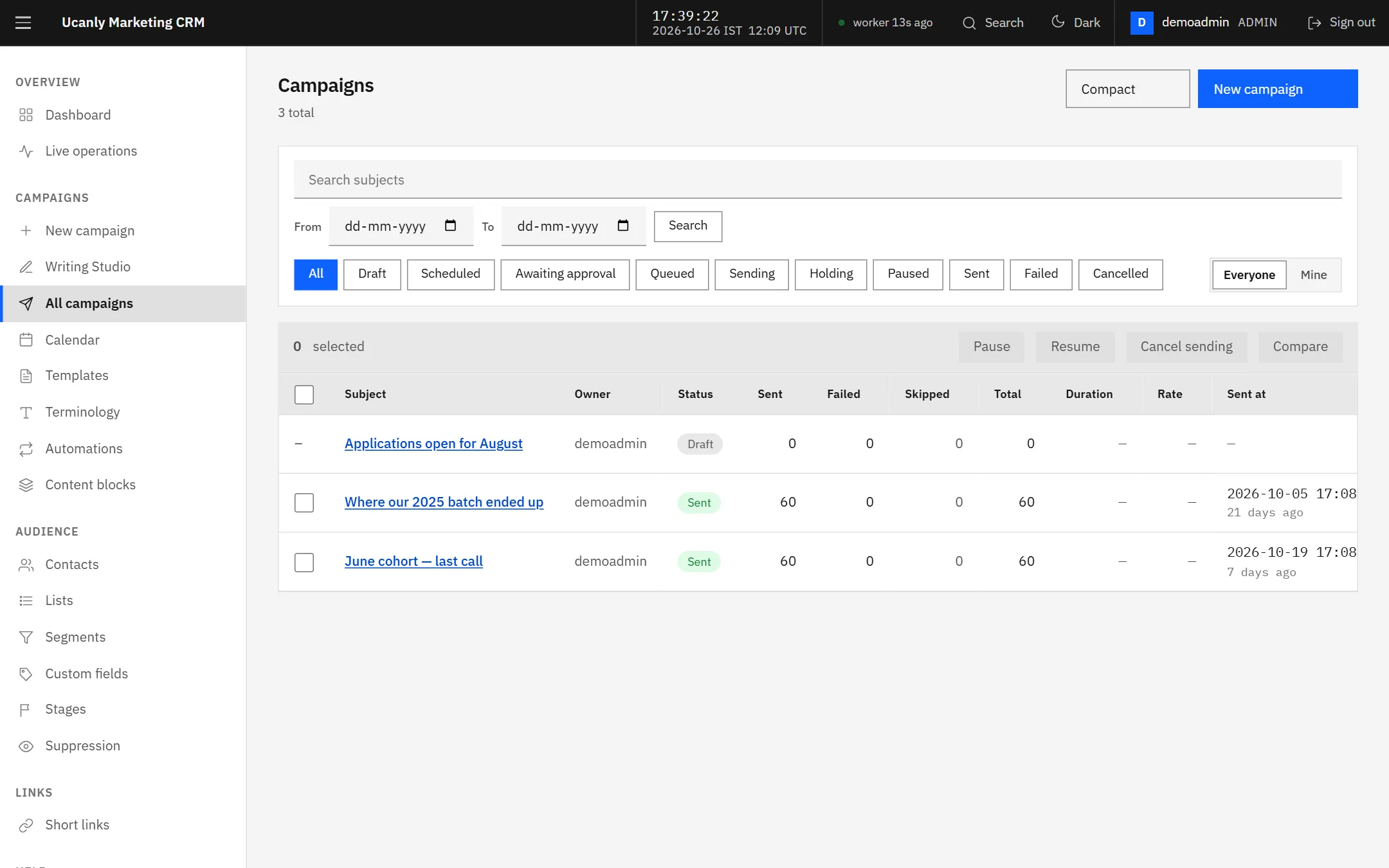
Every campaign, with drafts kept apart from what has gone out.
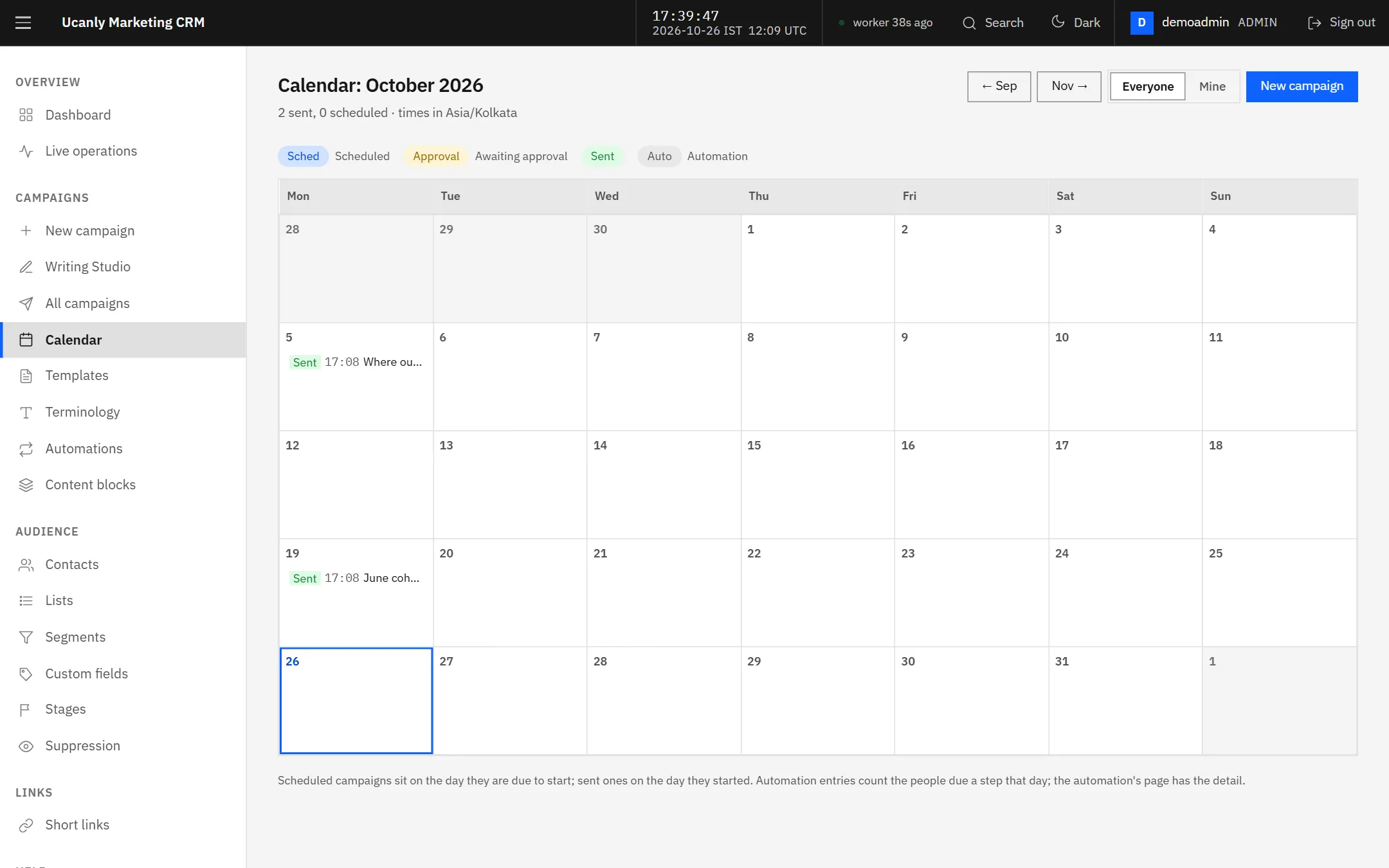
What is scheduled, waiting for approval, or already sent, by day.
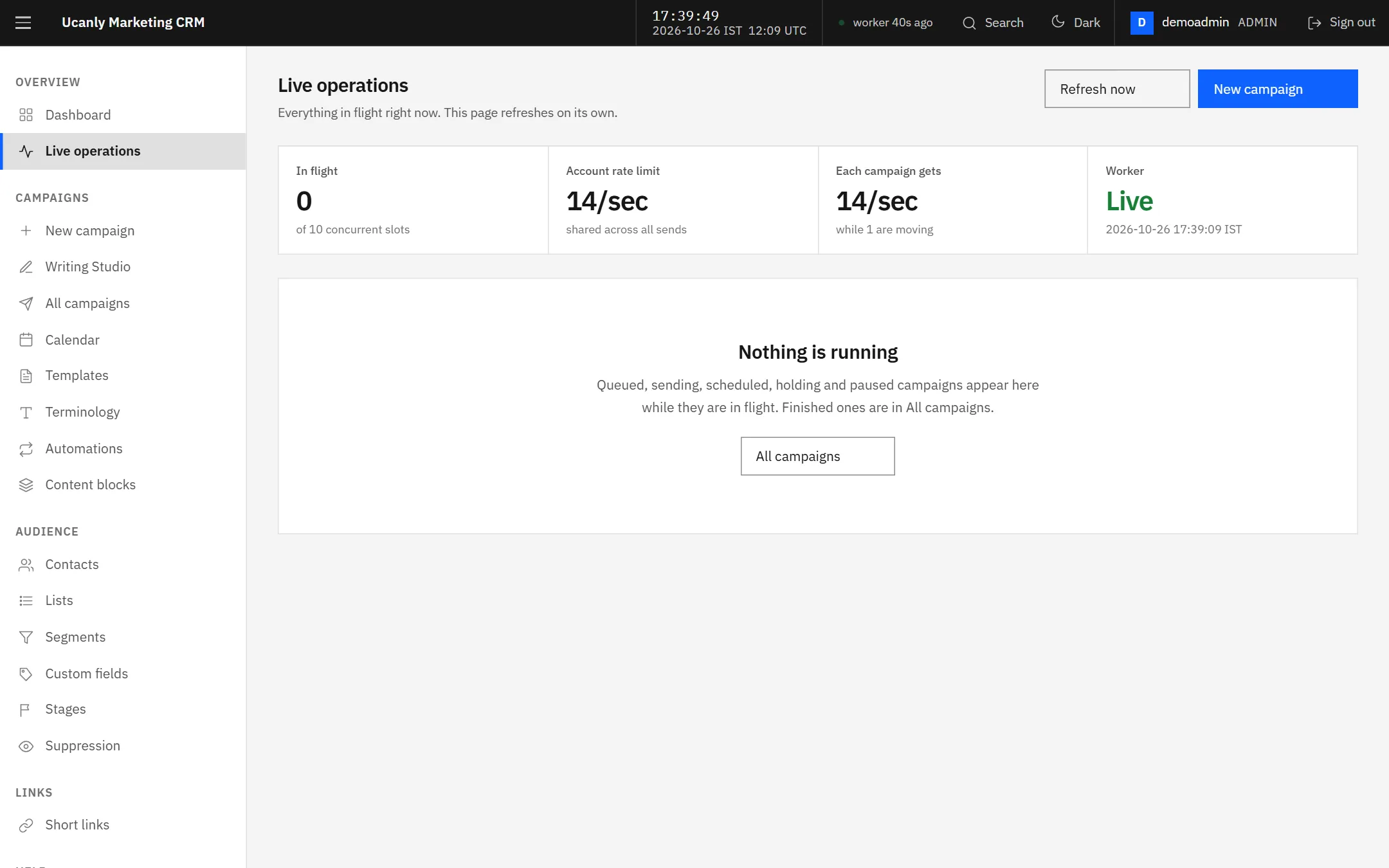
Live operations: what is sending right now, and how fast.
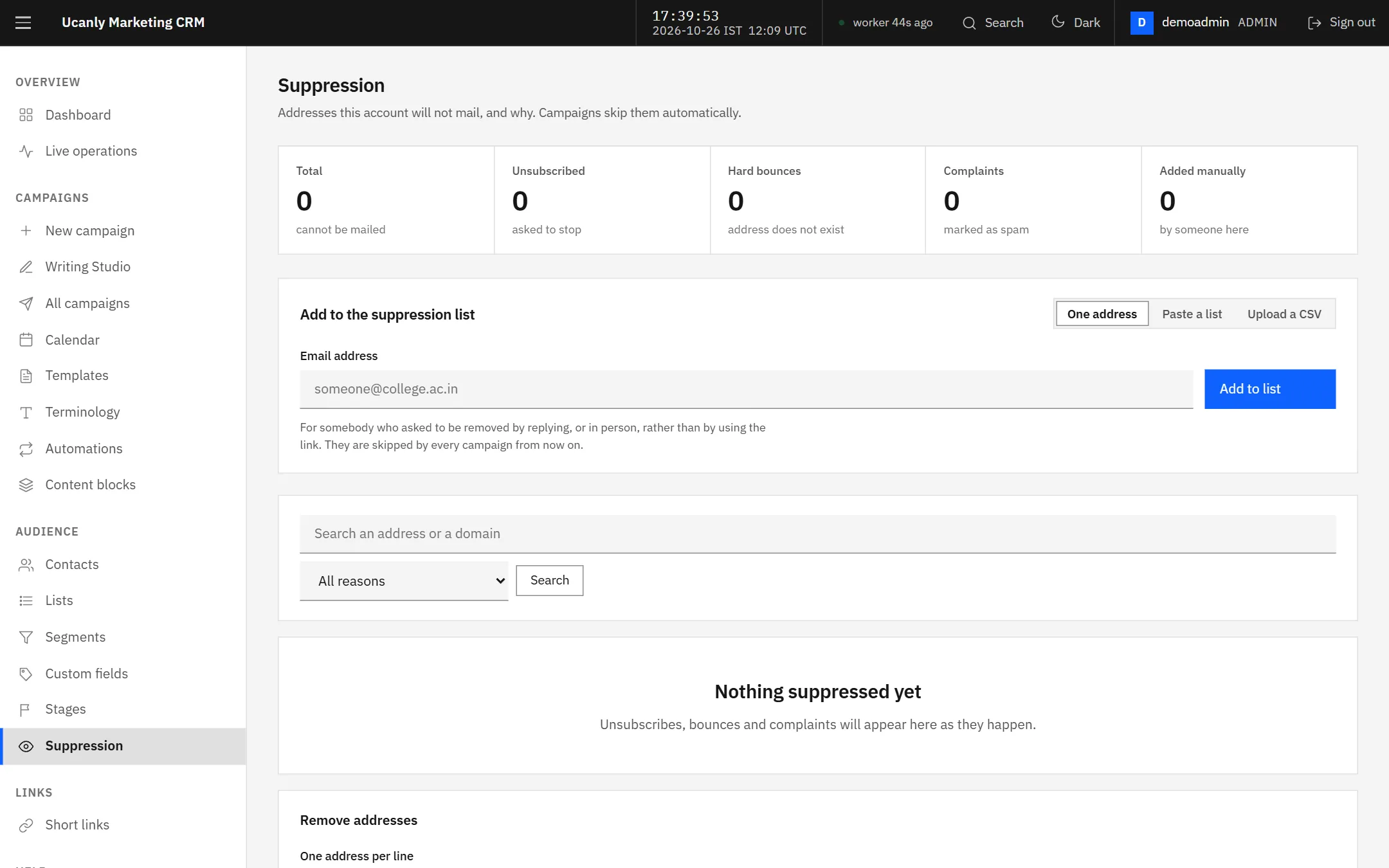
The suppression list. Checked when a campaign is queued and again for every message.
Questions people actually ask
Next step
Click through a working one.
The demo is loaded with invented contacts, campaigns and reports, and nothing on it can reach a real address.